Updates
Development in progress
Last update: . Click an entry to see the details.
-
14
-
New Alt+B New Alt+B (beta): the doll in the «Gear Score» section is laid out like the in-game inventory window #
- The new Alt+B window is in test mode (beta): there may be bugs and rough edges - tell us about them and attach a screenshot.
- The weapon is at the bottom of the left column, the shield or sigil at the bottom of the right one. A two-handed weapon shows in both hands, as in the game: the second hand shows a faded copy of it.
- Talismans are in a 2 by 3 grid next to the talisman bracelet. Slots the bracelet does not unlock are locked; hover to see how many slots the bracelet gives.
- The cloak slot is locked if your armor does not give a cloak.
- Hover over an empty slot to see what goes into it: cloak, belt, talisman, bracelet, etc.
-
New Alt+B New Alt+B (beta): new look for the «Vote reward» section #
- The new Alt+B window is in test mode (beta): there may be bugs and rough edges - tell us about them and attach a screenshot.
- How to vote, step by step; each site is a separate card with a banner, a reward and a timer.
- The timer shows right away whether you can vote: a green mark means you can, gold time shows how long to wait for the next vote.
- A site opens by clicking anywhere on its card.
-
Wiki "Interface" wiki: how to keep only the buffs you need in the party window #
- In «PVP» mode of the party window, each member shows only the effects from your list: buffs, songs, dances and triggers. Debuffs are on the row below and are not filtered.
- The list is set in «Party Window Options»: skill IDs separated by commas in the «PVP IDs:» field, for example «Pride of Kamael»
 is 1444.
 - To see only your own skills, without the built-in set of 50 PvP buffs, tick «Disable Default PVP IDs».
More in the wiki: Interface
-
New Alt+B New Alt+B (beta): the .gs command opens the «Gear Score» section in the new window #
- The new Alt+B window is in test mode (beta): there may be bugs and rough edges - tell us about them and attach a screenshot.
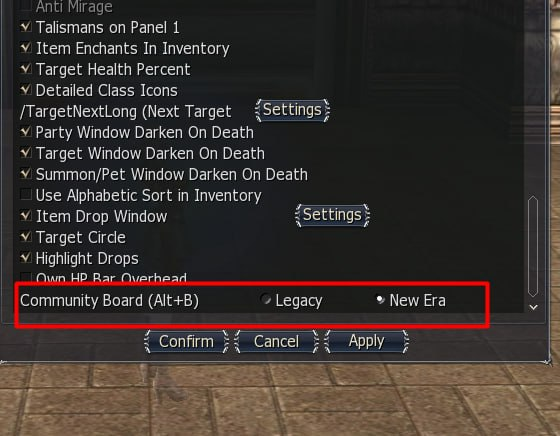
- If «New Era» is selected for «Community Board (Alt+B)» in the interface settings, the .gs command opens the new window right on the «Gear Score» section, and .gs party opens the party tab.
- With «Legacy», .gs works as before. .gs
and .gs with a player targeted also show the old window.
-
Client We made a fix against two client crashes: when an NPC appears and on a brief video card failure #
- The Assertion failed: Defaults.Num() crash when an NPC appears - after a teleport or on entering the game, more often with several game windows: the client sometimes took an NPC model that had not finished loading. Now it waits a little for it, and if it does not arrive, it skips that NPC instead of crashing: a monster will appear as soon as it moves, and an NPC standing still will appear when you walk away and come back.
- The IDirect3DIndexBuffer9::Lock failed (D3DERR_DEVICELOST) crash on a brief video card failure: the game window now waits out the failure instead of closing. A minimized or inactive window (for example, when playing in several windows) now waits up to 10 minutes for the video card to recover.
-
New Alt+B New Alt+B (beta): a fix against the window not opening when the game is run as administrator #
- The new Alt+B window is in test mode (beta): there may be bugs and rough edges - tell us about them and attach a screenshot.
- We made a fix against the window not opening if the game is run as administrator.
-
Wiki Wiki: all 496 quests now have walkthroughs #
- Before, 185 quests had a walkthrough, now every quest does: the stages in order - who to go to, who to talk to, what to kill, what and how much to collect, what the reward is.
- Walkthroughs are written for how quests work on our server. Where an NPC's dialog differs from what the quest actually requires, or where you can get stuck, the walkthrough has a warning.
-
New Alt+B New Alt+B (beta): the window opens even where the last opened section is closed #
- The new Alt+B window is in test mode (beta): there may be bugs and rough edges - tell us about them and attach a screenshot.
- We made a fix against the window not opening in instances and other zones where you cannot teleport or use the buffer, if the teleport or buffer was the last section opened in the window.
- Now in such a zone the window opens on the main page, and outside it - as before, on the last opened section.
-
Server Fixes against errors in 14 quests #
- «To the Primeval Isle»: we made a fix against the quest taking 169,380 adena on turn-in instead of giving it - now it gives it (with the quest reward rate).
- «Go to the Pastureland»: we made a fix against «Tunatun» not accepting the meat that «Vladimir» gives, which made the quest impossible to turn in.
- «Steps for honor»: we made a fix against the quest not being possible to take, and a taken one getting stuck after the first trial.
- «Brigands Sweep»: we made a fix against «Spiron» not accepting the brigands' trophies.
- «Dig Up the Sea of Spores!»: we made a fix against the adena reward for "Open Pouch" not being given.
- «For Sleepless Deadmen»: we made a fix against the quest requiring 100,000 remains instead of 60.
- «Repent Your Sins»: we made a fix against characters of level 21 and above being unable to start the quest.
- «Prove your courage!»: we made a fix against the head going to the wrong party member instead of the one who got credit for the step, which made the quest impossible to turn in.
- «Relics of the Old Empire»: we made a fix against some monsters, for example «Halisha's Officer» and «Beetle of Grave», not dropping relics.
- «Conquer the Hall of Erosion»: we made a fix against the kill of the boss «Cohemenes» counting for only one party member.
- «Block the Lord's Escape»: we made a fix against a defense victory not being counted, so the reward could not be received.
- «Resurrection of an Old Manager»: we made a fix against two branches of the conversation with «Wendy» leading to a dead end.
- «The Name of Evil - 1»: we made a fix against getting stuck by closing the dialog with «Mushika» or «Karakawei» halfway.
- «The Name of Evil - 2»: we made a fix against getting stuck by closing the dialog with «Asamah» halfway.
-
New Alt+B New Alt+B (beta): the «Appearance» section - in tiles and with page numbers #
- The new Alt+B window is in test mode (beta): there may be bugs and rough edges - tell us about them and attach a screenshot.
- Appearances are shown in tiles, 5 per row: 10 fit on a page without scrolling. A purchased appearance is marked with a check mark, the worn one with a gold frame.
- Try-on is the button with an eye, and the price is visible when you hover over a tile.
- Instead of "Back" and "Forward" buttons there are page numbers: you can jump straight to any page.
- We made a fix against some costumes having no picture.
-
Website New permanent Discord link: the old invite expired #
- The Discord button in the game and the links on the site now lead to the new invite: https://discord.gg/YkSewZxjRd
-
Wiki Wiki: breakdown of the «Trance»
 skill - what the sleep chance depends on, how long it lasts and how to protect yourself #
- The skill page now has a "Mechanics" block: what the sleep does, the chance formula and a step-by-step calculation, tables by «MEN», «M. Atk.» and «M. Def.», skill level and sleep resistance.
- What protects from sleep - with a number for each buff, armor set, jewelry piece and talisman; which Grand Boss necklaces strengthen sleep.
- How long the sleep lasts with a duration enchant, with the target's resistance and with a healer's sleep attack, and what breaks it: any damage, including «Mana Burn»
 .
. - A separate block - how the skill performed in fights between players on 11-21.10.2026: 1652 casts, 14.2% landed, the sleep ended on its own only 11 times out of 421.
-
New Alt+B New Alt+B (beta): the .vote command opens the «Vote reward» section in the new window #
- The new Alt+B is still in beta (test mode).
- If «New Era» is selected for «Community Board (Alt+B)» in the interface settings, the .vote command opens the new window right on the «Vote reward» section.
- With «Legacy», .vote works as before.
-
-
1
-
New Alt+B New «Community Board (Alt+B)» window - open beta #
- Community Board services in a new window: teleport, buffer, raid bosses, shop, blacksmith, auction, warehouse, clan, events, rankings, voting and more - with search, favourites and tooltips. The window can be collapsed into an icon and dragged around.
- To turn it on: game settings, interface tab, the «Community Board (Alt+B)» line - choose «New Era». To get the old board back - «Legacy».
- This is a beta: bugs and rough edges are possible. If something doesn't work right, write to us and attach a screenshot.
- The window is updated through the launcher - start the game through it.
-
-
8
-
Server Fix against an extra stone being lost when inserting an attribute #
- When inserting an attribute by double-clicking a stack of stones or crystals, once the item reached its attribute cap, one more stone than needed was burned. Now an attempt that has nothing left to add does not spend the stone. The auto-enchant service did not have this bug.
-
Server PvP Farm Zone: a new ranged monster #
- A level 85 «Maluk Sniper» has appeared in the zone. It attacks from a range of 800 - 20 times farther than the other event monsters - and hits with «Death Shot» no more than once every 12 seconds.
- Like the other event monsters, it does not attack players first. If another monster is being hit within 800 of it, the sniper comes to its aid.
- The sniper is one of 10 kinds of monsters in the zone, so on average every tenth monster. Its drop is the same as the others.
More in the wiki: Events
-
Wiki Wiki «Combat limits»: the full list of what gives critical power #
- The table «What gives critical power» now includes «Ring of Baium»
 - × 1.15, cursed × 1.10, improved × 1.30. For «Ring of Queen Ant»
  all versions are listed: cursed and the temporary one from the achievement - × 1.10, improved - × 1.20.
 - Added «Chant of Critical Attack»
 and «Critical of Pa'agrio»
  - the same as «Improved Critical Attack»
  . Together with them, the «Death Whisper»
  group does not work: «Chant of Rage»
  , the tincture, scrolls and drinks with this effect.
 - A new table «Class skills for critical power»: dagger focus skills, «Zealot»
 , totems, «Flame Icon»
  , «Spirit of Shilen»
  and others - with multipliers and conditions.
 - Debuffs that lower critical power and the multipliers of «Ring of Core»
 in critical defense are listed separately.
More in the wiki: Combat Limits
- The table «What gives critical power» now includes «Ring of Baium»
-
Server PvP Farm Zone: monsters stand one by one across the whole arena #
- Monsters no longer stand in clusters of 5-8. Each appears in a free spot of the arena, away from other monsters and from players, so the layout is new every time. A killed monster is replaced by a new one - also in a free spot.
- Melee monsters call for help only those standing right next to them, within 150, and with the new layout there is almost no one nearby. «Maluk Sniper» comes to help from afar - within 800.
- The number of monsters (100), their strength and drop have not changed.
More in the wiki: Events
-
Server Olympiad: the opponent for a 1 vs 1 fight is picked by points #
- The opponent for a 1 vs 1 fight is now picked by Olympiad points: one whose points differ from yours by no more than 2 times. Fewer than 10 points count as 10.
- If there is no suitable opponent, you wait for the next matching. For every minute of waiting the tolerance grows by 0.5: after 2 minutes an opponent whose points differ from yours 3 times will do, after 6 minutes - 5 times, after 10 minutes - anyone. The wait of whichever of the pair has waited longer counts: if your opponent has been waiting long, the difference in points may be larger. At the next matching you are put into a fight first, if there is a suitable opponent.
- Strong players now meet each other more often, and those with few points meet their equals. By calculation on the fights of the last two weekends, you will wait 6-11 seconds longer for a fight on average.
- The other rules against fixed fights are unchanged: fights start from 4 participants, clanmates and those who fought each other in the last 30 minutes are paired only if there is no other suitable opponent. The rules with current numbers are at «Grand Olympiad Manager», the «Protection Rules» button on the 1 vs 1 registration page. When you register for a 1 vs 1 fight, the points-matching rule also arrives in chat.
More in the wiki: Grand Olympiad
-
Server PvP Farm Zone: monster protection from polearms eased #
- Polearms deal 80% of normal damage to event monsters instead of 40%: instead of «Greater Resist Spear Weapons»
 they now have «Resist Pole Arm»
  .
. - The rest of the monsters' protection has not changed.
More in the wiki: Events
- Polearms deal 80% of normal damage to event monsters instead of 40%: instead of «Greater Resist Spear Weapons»
-
Server Alt+B: teleport to the entrance to «Baylor», the Gludio Mages Guild no longer leads to Aden #
- The «Territories of Hein» page now has a «Crystal Caverns» button: it takes you straight to «Oracle Guide», through whom you enter «Baylor». The tooltip on the button reminds you that this is the entrance to «Baylor». The point is also in the new Alt+B window.
- The «Mages Guild» button in the Gludio teleports took you to the Aden Mages Guild. Now it leads to the Gludio Mages Guild.
-
Server New .lakfi command - which «Lucky Pig» are in the world right now #
- The .lakfi command writes to the chat how many «Lucky Pig» are alive in the world right now, their level and area, for example "Lv. 80 - Dragon Valley: 1". There are no exact coordinates. Pigs that have already been fed and killed are not on the list - a new one will appear later on its own.
-
-
4
-
Client We made a fix against a client crash on entering the game #
- Occasionally the client crashed with a General protection fault error right after loading a character: the skill enchant window was built before the chat and tried to access it. Now the window waits until everything is fully assembled.
-
Client We made a fix against a crash near an NPC standing in water #
- For swimming NPCs, the game occasionally picked a nonexistent model point for air bubbles and crashed with a General protection fault error. Now such a point is replaced with the nearest real one.
-
Server «Baylor»: entering costs the party crystals of only two kinds #
- When entering «Baylor», one crystal is still taken from everyone, but only of two kinds shared by the whole party - the third kind is lost by nobody. To collect all three crystals again, the party needs only two cave paths instead of three, and missing crystals can now also be bought.
-
Server «Baylor»: entry without the cave bosses, crystals in the shop, a new reward in the chests #
- You can now reach «Baylor» right away: «Oracle Guide» at the start of «Crystal Caverns» shows the «Attack Baylor» button. You need a party of 2 or more characters, each with all three crystals. The old route through the cave boss remains.
- «Blue Crystal»
 , «Red Crystal»
  and «Clear Crystal»
  are sold in Alt+B - «Shop» - «Quest» for 100,000,000 adena each.
 - «Tears»: invulnerability is removed by a single «Water Dragon Scale»
 from any participant, even solo, with no chance of failure. The scale is sold in the same place for 5,000,000 adena.
 - Chests after «Baylor»: parts and recipes (60% craft chance) for Destino and Venus armor, finished Destino items and Icarus weapons, and in two random chests - «Blessed Scroll: Enchant Weapon (S-Grade)»
 and «Blessed Scroll: Enchant Armor (S-Grade)»
  , 1-3 pieces each. «Baylor's Earring»
  - 25%. These are final chances; a premium account does not affect them.
 - «Epic Jewelry Powder»
 : 30% for «Baylor», 20% each for «Tears», «Darnel» and «Kechi», rolled separately for each participant of the fight.
More in the wiki: Crystal Caverns
-
-
12
-
Wiki In the wiki NPC catalogue, peaceful NPCs are no longer listed as monsters, and siege objects have their own section #
- Castle mercenary managers (for example, «Greenspan»), chamberlains, gatekeepers, siege heralds and teleporters ended up in the «Monsters» filter and were labelled as monsters. Now they are in the «Other NPCs» section.
- New «Siege objects» section: castle guard towers and holy artifacts, fortress ballistas and mechanisms, territory flags - the things that are attacked or captured only during a siege.
- Each fortress page got a «Siege NPCs» subsection: the commanders, mercenary captain, ballista and control room devices of that very fortress with links to their pages, and the page of such an NPC links back to its fortress.
-
Server Changed the drop of «Lost Captain» in the Labyrinths of the Abyss of levels 39, 59 and 83: weapons no longer drop 2-3 at a time #
- Kamaloka (Labyrinth of the Abyss), lvl 78 - 85: «Icarus Trident»
 , «Icarus Sawsword»
  , «Icarus Disperser»
  and «Icarus Spirit»
  are rolled separately: about 2.5%, 2.1%, 1.6% and 0.9% per kill. At least one Icarus drops in about 7% of kills, as before, but no longer 2-3 at a time. «Icarus Trident» did not drop from this boss before.
 - There, instead of blessed S scrolls, regular ones drop from almost every kill: «Scroll: Enchant Weapon (S-Grade)»
 and «Scroll: Enchant Armor (S-Grade)»
  (1-3 pcs.). «Blessed Scroll: Enchant Weapon (S-Grade)» and «Blessed Scroll: Enchant Armor (S-Grade)» no longer drop from this boss.
 - Labyrinth of the Abyss level 39: «Flamberge»
 and «Stormbringer»
  are rolled separately - about 32% each per kill, both at once in about 10% of kills.
 - Labyrinth of the Abyss level 59: «Deadman's Glory»
 , «Art of Battle Axe»
  and «Staff of Evil Spirits»
  are rolled separately - about 7% each per kill.
- Kamaloka (Labyrinth of the Abyss), lvl 78 - 85: «Icarus Trident»
-
Wiki New «Castles» section in the wiki: sieges, Territory War, flags and a page for each of the 9 castles #
- How a castle siege goes: registration, the camp, guard and flame towers, capture with the seal on the artifact and what happens after it.
- What the owner clan gets: castle clan skills, territory flag skills, «Blood Alliance»
 for the defense, castle functions with prices, «The Lord's Crown»
  and the circlet.
 - Territory War: when it runs, how to sign up as a clan or a mercenary, what badges come from and where to spend them, including Noblesse for 100 badges.
- Each castle page shows its clan skills with bonuses, its flag, castle NPCs, siege objects and war NPCs with links to the NPC catalogue, and the pages of these NPCs link back to the castle.
- On castle chamberlain pages the shop is no longer labelled as mercenary hiring, and mercenary managers now have only the 3 shops that open in the game.
- Castles and fortresses in page titles, breadcrumbs and lists are named as in the client: in Russian on the Russian page, in English in the other languages, as in the English client.
- In wiki tables with one skill per column cell (skill books, Seed of Destruction room boosts, changed buffs, castle flags), the skill name is now a link to its page.
More in the wiki: Castles
-
Server We made a fix against the «Enter Chat» setting resetting after the «Valakas» and «Antharas» cutscenes #
- Before, after the dragon's appearance or death cutscene, keys started typing straight into the chat, and you had to tick «Enter Chat» again.
-
Server Your own teleport point in Alt+B: saving under a name already in use moves the point #
- We made a fix against losing adena when saving your point again: before, «Save a point» under a name already in use charged the price, and after relogging the point stayed in the old place. Now the point with this name (upper and lower case, «е» and «ё», trailing spaces are not distinguished) moves to where you are standing.
- Your point's name can have up to 10 letters, digits and spaces; other characters are not accepted.
-
Server We made a fix against the error that left only one «Flame Control Tower» of two standing in the «Giran Castle» siege #
- The second tower appeared outside the map because of an error in its coordinates. Now both towers stand by the castle walls, as at the other castles: while at least one stands, the traps by the walls slow the attackers down.
More in the wiki: Castles
-
Website The Telegram and Discord bot will tell you if your character is killed on autofarm #
- If your character is killed and the autofarm stops, the bot sends you a private message: who died, on which server and when, who killed them (a player, a player's servitor or a monster) and how much paid autofarm time is left.
- The notice is turned on separately for each character: in the Telegram cabinet on the character card, in the bot - «My accounts», then the account and the character, or in your account on the website on the character page. Off by default. The message goes to all linked messengers.
- Available with a premium account. If premium ends, messages stop coming, and with new premium they resume on their own, no need to turn it on again.
More in the wiki: Autofarm
-
Wiki The wiki now has a schedule straight from the server: the next siege of each castle, Territory War and the epic boss respawn #
- The castle page has a «Castle siege» block: the date and hour of the next siege (or «siege in progress» right now), until when registration is open and how many clans have registered as attackers, the owner clan and its alliance, how many and which territory flags it holds now (with links to them), and when the Territory War is. The general «Castles» page shows the same sieges and owners of all 9 castles in one table, with the number of flags each holds.
- On the epic boss page and in the Raid Bosses section - when the boss comes back according to the server: the date and hour of the respawn, or that it is in place, or that a fight with it is going on.
- The time is shown as server time (Minsk, UTC+3) and next to it in your time zone. The data is updated every 30 minutes.
- A view of each castle is now a large picture right under the title of its page.
More in the wiki: Castles
-
Wiki Wiki: a breakdown of the skill «Final Secret»
 - two bonuses and why the .stats window shows only one #
- The skill page got a «Mechanics» block: the physical skill damage × 1.3 works on any target, including monsters, and the regular attack damage × 1.3 only in PvP.
- Why in the .stats window only the «Phys. Dmg» line grows with the buff while «Phys. Skill Dmg» does not change: the skill bonus is not a PvP multiplier, so it is not in this block, but it is in every hit.
- How the buff stacks with «Patience»
 , «Physical Pose»
  and the +93 bonus from «Olf's T-shirt»
  , and why the charge skills of «Duelist» and «Grand Khavatari» get the bonus only against players.
 - A separate block is a check on fights between players for 05-18.10.2026: 767 skill hits with the buff and 1 200 without it, the increase matches the calculation.
-
Website When the administration credits an item to your warehouse on the website, the bot sends a message in Telegram and Discord #
- If your website account is linked to the Telegram or Discord bot, after a credit from the administration the bot writes which item and how many arrived in the warehouse.
- Buttons under the message: open the warehouse on the website and view the warehouse right in the bot. You can withdraw the item to any of your characters on the website, in the «Warehouse» section.
-
Server The .stats window: the «Phys. Skill Dmg» line now takes skill power into account, for example from «Final Secret»
#- Before, «Final Secret» raised only the «Phys. Dmg» line in the window, and the skill damage bonus was not visible, although it worked. Now the «Phys. Skill Dmg» lines in the «PvP Damage» and «PvE Damage» blocks and «Bow Skill Dmg» show the full skill damage multiplier.
- Example: PvP bonus from gear 15.8%, with the buff the PvP skill line shows 50.5%, same as the regular attack line; in PvE - 30.0%.
- Skill power multipliers are counted - «Final Secret» , «Patience» , «Physical Pose» . The flat +93 bonus from «Olf's T-shirt» is not part of the percentage.
- Skill damage has not changed - only what the window shows has.
- Before, «Final Secret»
-
Server Autofarm and its automatic rebuff turn off when you register for the Olympiad #
- We made a fix against a bug where the autofarm rebuff could apply buffs in the Olympiad stadium, after the Olympiad had removed the participant's buffs.
- As soon as a character registers for the Olympiad, autofarm is turned off together with the rebuff. While the character is in the queue or in a match, autofarm cannot be turned on.
- The rebuff also does not buff in spectator mode, in a duel, at events and in combat zones.
-
-
13
-
Server A fix was made: tickets for the monster race can be bought from «Race Manager» #
- After choosing a monster in «Purchase Ticket», the bet window did not open, so a ticket could not be bought.
- The «View Odds» window now opens after ticket sales close and shows each monster's odds based on the bets placed on it. Before, it did not open.
- Monster names in the betting window now stand under the same lane numbers by which the winner is announced and tickets are paid out.
-
Client A fix was made against the «Lock failed (D3DERR_DEVICELOST)» crash on a video driver failure #
- If the video driver briefly takes the graphics card away from the game, the client should no longer close with the error «IDirect3DIndexBuffer9::Lock failed» or «IDirect3DVertexBuffer9::Lock failed»: the game skips a frame and waits for the graphics card to come back.
- If the graphics card does not come back within 10 seconds, the client closes with the same error as before.
-
Website Wiki: a new home page with sections in groups and search through all articles in the site's language #
- The wiki sections are now grouped: server and account, reference, character, gear, bosses and instances, PvP, rewards, client and convenience. At the top are the sections worth starting with, and every section has a short caption.
- The wiki search looks through the text of all articles in the site's language and takes you straight to the right subsection. It understands typos, text typed in the wrong keyboard layout and abbreviations like GB, RB, LS.
- If you type the name of an item, monster or skill mentioned in the wiki, the search shows its card and the articles that write about it. When dozens of items match the query, a few are shown along with a link to the full list in the catalogue.
-
Wiki Wiki: the Monsters and NPCs list now has a Grand Boss block at the top #
- Every Grand Boss with a spawn schedule now sits above the main list - no need to look them up by name or with a filter.
- The card leads to the boss page: schedule, lair entry and the full drop list.
-
Wiki Wiki: the "Custom Features" section has been split by topic, and the information has been checked against the server #
- New sections "Trade" (private stores, offline trading, item auction) and "Crafting and rare items". The other subsections have moved to the sections they belong to; old links open the right place.
- Offline trading: from level 20 (was 40) and only in a peaceful zone.
- Crafting: the correct way to finish a Foundation blank and how much «Mammon's Varnish Enhancer» it takes; recipes up to C grade have a 20% chance to give 2 items.
- Forgotten Scrolls x10: the correct skills for all six scrolls and the correct class list.
- Soul crystal icon in the target window: corrected who gets the crystal level-up with a red and with a blue icon.
- Added: private store slots, auction bidding rules, how to earn Fame and what to spend it on, the shared solo Kamaloka limit.
More in the wiki: Trade
-
Wiki Wiki: instance guides now live on the zone pages themselves #
- Everything that was in the "Instance bosses" section is now in the "Guide" block on the zone page in the instance zone catalogue, next to the level, party, reset and monsters: «Zaken», «Freya», Frintezza, «Tiat», Source of Immortality, Hall of Suffering, Hall of Erosion, Edge of Reality, Tower of Eternity, «Baylor», Labyrinth of the Abyss and the solo Kamaloka.
- The pages of neighbouring zones have a short description and a link to the guide.
- The breakdown of the «Freya» fight (stages, knights, blocks of ice, balcony) has also moved to her zone's guide; old links to the section lead there too.
- Seed of Annihilation has its own wiki section: it is an open hunting zone, not an instance.
More in the wiki: Cavern of the Pirate Captain (Nightmare)
-
Server Chat messages can now be up to 250 characters long - as much as fits in the input line #
- Previously a message longer than 105 characters silently failed to send, and the text had to be split into two messages.
- The spam protection hint in the system chat has been rewritten: it no longer suggests restarting the client, but says that the message is too long or is being sent too often.
-
Server A new «Adena Only» toggle in .cfg: auto-loot picks up only adena #
- Turn on «Adena Only» in .cfg or with the .autolootadena command - only adena from monsters will go to your inventory, the rest of the drop will stay on the ground.
- The toggle overrides «AutoLoot»: with it on, only adena is picked up, even if auto-loot is enabled. Turn it off - and auto-loot follows the «AutoLoot» toggle again, as before.
- «AutoLoot Herbs» works separately: herbs are picked up by their own toggle.
- In a party where loot is distributed other than «Finders Keepers», items are still handed out by the party rules: an item that falls to you will go to your inventory.
- The toggle is off by default - if you change nothing, auto-loot works as before.
- Hovering over the button in .cfg shows a hint on how the mode works.
More in the wiki: Voice Commands
-
Wiki Wiki: the bosses section now details debuffs on bosses and the clan damage table #
- Debuffs: how the chance is calculated on raid bosses and Grand Bosses, each boss's multiplier and an example - what a 60% chance against a regular target turns into. A separate explanation of why almost any debuff lands on «Antharas» and «Valakas» with a 10% chance.
- Clan damage: which bosses have a table, whose damage counts in it, how to read the numbers and when the count starts over.
- Boss names link to their pages in the NPC catalogue, with links to the schedule, the Grand Boss entry and a breakdown of the stun chance.
More in the wiki: Raid Bosses
-
Server A change was made against an equipped talisman being taken off when talismans auto-merge #
- Previously, if you had a talisman equipped and received another identical one (pickup, reward, trade), the merged talisman ended up unequipped in your bag and its effect was lost until you equipped it again.
- Now the equipped talisman stays in its slot and the second one's time is added to it. The .combinetalismans command works the same way.
More in the wiki: Server Information
-
Server Crafting: the «Zubei's Gaiters»
 recipes now follow the general B-grade rule for the rare result #
- The «Recipe: Zubei's Gaiters (60%)» and «Recipe: Zubei's Gaiters (100%)» recipes have the same rare result as all B-S84 weapon and armor recipes: with a 4% chance (6% with a premium account) you get a single pair of «Foundation Zubei's Gaiters»
 .
. - Previously these two recipes mistakenly gave two Foundation items with a 20% chance.
More in the wiki: Crafting and rare items
- The «Recipe: Zubei's Gaiters (60%)» and «Recipe: Zubei's Gaiters (100%)» recipes have the same rare result as all B-S84 weapon and armor recipes: with a 4% chance (6% with a premium account) you get a single pair of «Foundation Zubei's Gaiters»
-
Server A change was made: auto-use of souls and force now posts its own chat message when switched on and off, instead of the CP potion message #
- This applies to auto-use of Kamael soul bottles and energy stones.
- On the English client, the message shown when the selected potion is not in the inventory is now worded more clearly.
-
Server The «Delay before disconnect» line was removed from the .cfg menu: it had no effect #
- After a disconnect, every character stays in the world for 120 seconds, as before.
More in the wiki: Server Information
-
-
6
-
Client Client: made changes against several kinds of crashes #
- This concerns crashes when switching to full screen with several windows open, when a location is loading and when selecting a target.
-
Server Fix applied: the healing power bonus from weapons, talismans, tunics and buffs now works for the one who heals #
- Before, «+N healing power» only took effect when the owner of the item or effect was the one being healed, while their healing of others stayed ordinary.
- Now the bonus is added to each of your heals for a number of HP - on each target, in a group heal on each party member and on yourself once.
- This is how «Sword of Divine Power»
 and «Staff of Divine Power»
  of the Holy Spirit weapons work, as well as the special ability «Item Skill: Heal Empower»
  , healing talismans, Dynasty tunics for healers, «Blessed Necklace of Freya»
  and the Cardinal's «Divine Power»
  .
. - Percentage bonuses to received healing (Shield Master sets, prayers) and curses that reduce healing still act on the one being healed. Healing as a percentage of HP («Chain Heal»
 ) is not changed by the bonus.
 - On the «Antharas», «Zaken» and «Orfen» earrings, rare «Dark Crystal» parts and Shield Master sets the bonus in the description is now called «Received healing»: it only works when the owner is being healed, by any healer. Nothing has changed here, only the name was corrected.
- The descriptions of these skills and talismans have been rewritten: they now say who the bonus applies to.
-
Server Fix applied: a party member in another part of the world no longer lowers the XP rate of those who are leveling #
- The XP and SP multiplier from monsters depends on level. In a party it is taken from the highest level among the members, and before, all members counted, even those standing in another location. A level 75 character in a party with a level 85 character at the other end of the world got XP at x1 instead of x3 and SP at x2 instead of x3.
- Now only the members near the monster count - the same ones who share the XP for it. If a level 85 character stands nearby and levels with you, everything stays as it was.
More in the wiki: Server Rates
-
Server Fix applied: «Leprechaun» hides only near monsters and does not stand inside walls #
- Before, «Leprechaun» could stand next to an NPC in town, a trap or a chest, even though the announcement names the nearest monster. Now he hides only near ordinary monsters.
- He stands a few steps away from the monster in an open, reachable place, and not behind a closed door. Before, he could end up inside a wall or a building - he could be targeted but not seen.
- «Leprechaun» no longer appears on the Gracia continent («Keucereus Alliance Base» and the Seeds).
More in the wiki: Events
-
Server The clan warehouse holds 450 items instead of 500 #
- The adjustment was made because of technical limitations of the game client.
More in the wiki: Clans and Alliances
-
Wiki The wiki now has the correct inventory and private warehouse sizes #
- Inventory - 200 slots, 300 for dwarves; private warehouse - 200 slots, 250 for dwarves.
More in the wiki: Starting Conditions
-
-
16
-
Wiki Wiki: a new section «Clan quests» in the quests #
- The clan quests are gathered: clan level and alliance, the clan halls taken by a quest, quests for an Academy member with a sponsor and the dungeons of fortresses and castles.
- The section opens from the quest list, and a quest page shows the section's mark.
- Every quest of the section got a step-by-step walkthrough: where to get the quest, who can take it, where to go, which monsters to hunt and what you get at the end.
-
Wiki Wiki: the NPC page got the block «Takes part in quests» - quests where you come to the NPC along the way, though another NPC gives them #
-
Server Fixes to clan quests: rewards, the witch Athrea's trial and entry checks #
- «Pursuit of Clan Ambition!»: for «Scepter of Judgment»
 the witch Kleo now completes the quest with a reward - «Seal of Aspiration»
  and 250 000 SP; before, the quest was cancelled at this point with no reward.
 - «Pursuit of Clan Ambition!»: for «Black Anvil Coin»
 Balthazar gives the promised «Recipe - Spiteful Soul Energy»
  .
. - «Proof of Clan Alliance»: in the witch Athrea's trial five different boxes appear instead of aggressive dragons; if you clear all 16 boxes of your clan, the four enchanted ones will be found. A retry costs 10 000 adena only, and the clan leader can also pay for it and start it.
- «Competition for the Bandit Stronghold»: only a leader of a clan of level 4 or higher without a clan hall, fortress or castle can take the quest; «Tarlk Amulet»
 goes to the one who killed the monster, not to a random party member.
 - «Blade Under Foot»: membership in the clan that owns the castle is now checked for every party member, not only the leader.
- «The Leader and the Follower»: the dialogue now gives the right number of crystals for heavy armor - 922.
- «Pursuit of Clan Ambition!»: for «Scepter of Judgment»
-
Wiki Wiki: a breakdown of the skill «Curse Fear»
 - what the chance depends on and how to protect yourself #
- The skill page got a «Mechanics» block: what fear does, the chance formula and a step-by-step calculation, tables by «MEN», «M. Atk.» and «M. Def.», skill level and protection from mental attacks.
- What protects from fear - with a number for every buff, potion, talisman and jewel. Which boss jewelry raises the chance: «Earring of Antharas»
 , «Earring of Zaken»
  (and their enhanced versions) and «Ring of Beleth»
  give both mental attack and protection, «Necklace of Freya»
  - protection only.
 - How long fear lasts with a duration enchant, with the target's protection and with the mage's mental attack.
- A separate block on how the skill did in fights between players on 11-15.10.2026: 386 casts, 8.8% landed.
-
Wiki Wiki: the NPC page is updated - the key facts in the header, quick links to the blocks, a wide map with a legend and quests in one block #
- The header shows the kind, level and ID as badges, the NPC's title and links to the map, quests, shop, guard, drop and spoil.
- The «Where to find» map is wider, with a legend next to it and a hint on how to move and zoom it.
- Quests are gathered in one block: gives, takes part, needed for quests; each shows its level, who gives it and whether it has a walkthrough.
- Epic bosses are marked in gold, and their page has an «Epic boss» block: the spawn day and hours from the server settings, server time (Minsk, UTC+3) and the same time in your time zone, the pass, the quest for the pass and links to the wiki.
- Epic jewelry is marked in gold in the drop and spoil tables, quest rewards, shops and item search.
- Every kind of NPC has its own color in the tabs, cards and on the page: monsters are green, raid bosses blue, Destruction bosses purple, epic bosses gold.
-
Wiki Wiki: an article on the Destruction bosses and Blood Altars, an altar block on every boss's page and a filter in the NPC catalogue #
- 17 Blood Altars by the towns, bosses appear at 12: every 4 hours an altar wakes with a 50% chance, the bosses stay up to 4 hours.
- A table: which boss is at which altar, its level and which Scroll of Destruction it drops. The scroll is safe: the chance is normal, but on failure the item keeps its enchant.
- The «Worshipper» page shows all altars on the map and the bosses of each altar, a boss's page shows its altar and neighbours.
- The NPC catalogue got a «Lords of Destruction» filter for raid bosses.
More in the wiki: Raid Bosses
-
Server Fortresses: in the Russian teleport window the west and east gate buttons led to the opposite gates - a fix has been made #
- The captions «Fortress West Gate» and «Fortress East Gate» now match where the button takes you.
- In one of the fortresses «Field of Silence Center - 500» and «Field of Whispers Center - 500» were fixed too.
-
Website Telegram cabinet: a session lives 6 hours, actions only from a fresh launch #
- An open Telegram cabinet now works for 6 hours (it used to be a day), then it asks you to open it again from the bot.
- Sign-in, registration, PIN, warehouse withdrawal, game account creation and tickets are accepted only if the cabinet was opened no more than an hour ago; otherwise you get the same request to open it again. That makes stolen launch data worth less.
-
Server Fix applied: event pumpkin lines are now hidden by the chat setting «Do not view NPC dialogue» #
- Pumpkins used to write to the general chat like players, and the chat settings checkbox did not hide them.
-
Server Auto-loot now follows the character's setting, including on autofarm #
- Fix applied: the «AutoLoot» and «AutoLoot Herbs» toggles in .cfg decide for the character both in normal farming and on autofarm. Autofarm used to pick up drops by itself, even with auto-loot turned off.
- Until the player changes anything, drop auto-loot is on, as before; herbs are not picked up by default.
- If the inventory has no room or would be overweight, the item stays on the ground instead of going over the limit.
-
Client Fast Alt-clicks on items no longer open the quantity input window #
- In NPC sell and buy windows, trade, warehouse, private store, mail and freight, each Alt-click moves the whole stack, even with no pause between clicks.
- A double click without Alt works as before - with quantity selection.
-
Server Damage over time from «Flame Hawk»
 , «Arrow Rain»
  and «Ghost Piercing»
  is now a debuff, as on the official server #
- It is shown among debuffs.
- As before, it is applied on every hit of the skill, with no separate chance - this is how the official server works too. «Cleanse»
 removes it, as before.
 - The target's debuff resistance shortens it, as with all debuffs: 10 seconds without resistance, 9 seconds at +10, 7 seconds at +40.
- As on the official server, it shares a slot with damage over time of other skills: a second archer's damage on the same target replaces the previous one, and a stronger damage over time (for example, «Decay»
 or «Inferno»
  ) prevents it from being applied and removes it.
 - Skill descriptions corrected: 300 damage per second for 10 seconds, a character loses CP first, this damage cannot kill - the target is left with 1 HP.
-
Server «Valakas»: the lair entrance closes the moment the appearance cutscene starts #
- Fix applied against entering «Valakas»'s lair during his appearance cutscene: «Heart of Volcano» used to keep letting players into the lair while the cutscene played, and those who entered could attack the ones watching it.
- Now the entrance closes as soon as «Valakas» appears - as with «Antharas».
-
Client Armor mastery enchant descriptions show real numbers #
- In the skill enchant window, for «Light Armor Mastery», «Heavy Armor Mastery» and «Robe Mastery» of all classes, as well as «Fast Mana Recovery»
 , «Ancient Sword Mastery»
  and «Chant of Fury»
  , the enchant line shows the total value and the value without enchant, for example «P. Def.» +86 (without enchant: +81.3). It used to show the bonus for a single step, in places with an erroneous "%".
 - «Robe Mastery»
 : enchanting the MP recovery and «M. Def.» routes lowered «P. Def.» from 87.4 to 84.7, now it stays 87.4.
 - «Guard Stance»
 : enchanting the cost route lowered «P. Def.» from 256.5 to 256, now it stays 256.5.
- In the skill enchant window, for «Light Armor Mastery», «Heavy Armor Mastery» and «Robe Mastery» of all classes, as well as «Fast Mana Recovery»
-
Server Last Hero and Treasure Hunt: fix applied against helping allies - every man for himself #
- When moved to the arena the party disbands, and you cannot join a party during the event.
- Healing, restoring CP and MP and buffing work only on yourself. Some healing skills, for example «Chain Heal» , used to work on clan members and the party.
-
Server Life Stone insertion of your choice is open to everyone: the .ls command, price 300 «Coin of Luck»
 #
#- The chosen skill goes into the weapon in the right hand, the previous augmentation is removed.
- The private warehouse tile (it is on the main page) and the fitting room tile have been removed from the «Services» section in Alt+B.
- On the blacksmith page in Alt+B the Life Stones button opens the augment of your choice, the augmentation removal button has been removed.
-
-
15
-
Server A fix was made against a bug in the time zone of «Jinia»: after her story the exit button did not work and the NPCs around disappeared #
- Affects the quests «Acquisition of Divine Sword», «Meeting Sirra», «Reunion with Sirra» and «Story of Those Left».
- Previously, after the last conversation with «Jinia» the time zone would close: the exit button did not respond, the NPCs around vanished when clicked, and after relogging the character ended up in an empty place and had to teleport out.
- Now the character stays in the time zone until they press the exit button themselves, and is moved to «Rafforty». If the dialog window was closed, just talk to «Jinia» again - the exit button will appear again.
- In the quest «Reunion with Sirra» the next step is now counted right after the conversation with «Jinia», not on the exit button. Before, if you did not press exit within a minute, the quest did not progress.
-
Wiki Wiki: a monster page now shows who brings it out, on what trigger and with what chance; Rift monsters are shown by its levels #
- In the «How it appears» block: the trigger (death, hit, skill, combat, time), the chance from the server code and the conditions: overhit, HP threshold, an accepted quest, inside an instance.
- For Beast Farm animals: the spice, the chance on each feeding and the chance to become a pet.
- Rift: which «Rift Post» sends you to the rooms, how many «Dimensional Fragment»
 the entrance costs and how many players are needed.
 - Monsters that a quest merely hunts are no longer marked as brought out by a script.
- Monsters of Tully's Workshop, Cloud Mansion, the Pagan Temple and the Valley of Dragons: it is now stated who brings them out and when; the guards of Andreas Van Halter, the servants of «Darion», the migration dragons of the Valley of Dragons.
- At the entrances to the Seed of Infinity (Hall of Suffering, Hall of Erosion, Heart of Infinity) the NPC who lets you in is named, along with the fact that he stands only on some stages of the Seed.
-
Wiki Wiki: a catalogue of instance zones and Rift levels, and instance monsters now link to their zone #
- The «Instance Zones» section: search, filters by kind and level; a zone page shows the level, party, time limit, re-entry, entry fee, required quest, who lets you in (with a map), and the bosses and monsters inside.
- On a monster page and in the drop and spoil tables of an item page, the monster's instance zone is now a link to its page.
- Mini-bosses and monsters of the group Kamaloka are now tied to their own zone rather than to all of them at once.
- In the dungeons of castles and fortresses, the lists of raids by stage, from which the zone picks at random, are shown.
- The wiki now includes PvP Farm Zone monsters with their drop, Kamaloka 80+ monsters and event monsters; monsters of a disabled event carry the mark «event disabled».
-
Server A fix was made against shortened negative effects: on an unprotected target they now last as long as the skill description says #
- Previously, on an unprotected target a negative effect lasted 1 second less than written: «Shield Stun»
 - 8 seconds instead of 9, «PvP Weapon - Ignore Shield Defense»
  - 9 seconds instead of 10.
 - Affects stuns, sleep, hold, disarm, aggression and other negative effects, including monster skills. Poisons and bleeds deal one more hit of damage.
- Most noticeable on short effects: «Aggression»
 - 3 seconds instead of 2, «Disarm»
  - 5 instead of 4, «Shield Bash»
  - 2 instead of 1.
 - Effects that an attack skill applies to the attacker themselves, for example «Blinding Blow»
 , also last the written time.
 - Resistance to an effect still shortens its duration; sometimes the result is 1 second longer than before. The chance to land the effect has not changed.
- Previously, on an unprotected target a negative effect lasted 1 second less than written: «Shield Stun»
-
Server A fix was made against a bug: in a transformation, a buff could not be removed from yourself by Alt+click on its icon #
- Previously, while a character was in any transformation, Alt+click on a buff icon did nothing. For example, a Bishop in the «Inquisitor»
 form could not remove a single buff from themselves.
 - Now in a transformation Alt+click removes a buff the same way as without one.
- The transformation itself still cannot be removed by Alt+click - use «Transform Dispel»
 for that, and you leave the Inquisitor stance with the skill «Switch Stance»
  .
.
- Previously, while a character was in any transformation, Alt+click on a buff icon did nothing. For example, a Bishop in the «Inquisitor»
-
Wiki Wiki: the sections «1st, 2nd and 3rd Profession Quests» and walkthroughs for all 82 profession quests #
- Each section lists all classes by race and the quests that lead to them, in order: name, level, who gives it. For the 2nd profession, the quest that gives all three marks at once is shown separately.
- Profession quests now have a walkthrough: the stages in order - whom to visit, where they stand, whom to kill, what and how much to collect. The names of NPCs, monsters, items and classes are links to their pages, and hovering over an NPC shows a map.
- The walkthroughs are written for how the quests work on our server. Where an NPC's dialog sends you the wrong way, the walkthrough has a warning.
- A profession quest page shows which classes it is for and which profession it leads to. And a class page in the class tree shows the quests that lead to it, with links.
- The wiki section «Professions and Noblesse» now links to these sections, and the Noblesse chain links to the pages of its quests. In return, the walkthroughs link to the table of the extra reward for changing profession.
-
Website The personal cabinet now opens right in Telegram: the «Cabinet» button of our bot #
- The cabinet opens in Telegram without a browser and without entering a password.
- If Telegram is not linked yet, in the cabinet you can sign in with your website login and password or create a new account - with an email and password, as on the website, so you can log in to the website later too. The email can be confirmed later: the cabinet will remind you and let you send the email again.
- Game accounts and characters: level, class, who is in the game right now. You can create a new game account.
- Character card: class, level and experience, subclasses, PvP and PK, fame, Gear Score, time played, nobility and hero status, clan, buffs as of the last save. Inventory with a warehouse, search and a wiki link on every item.
- The account warehouse and withdrawing items to a character. Withdrawal is protected by a PIN code: you set it in the cabinet with your website password, and the same way you can set a new one if you forgot the PIN. After 5 wrong attempts, PIN entry is blocked for a while.
- Server rankings, as on the website, and the respawn time of epic bosses.
- Support: your own tickets, the conversation, replying and a new ticket with screenshots. From the bot's message about a support reply, the ticket opens right in the cabinet.
- On the website: until the email is confirmed, the personal cabinet shows a reminder with a «send the email again» button. The website password can be reset only to a confirmed email.
-
Server Buffs removed by someone else's cancel are now marked in chat with a separate line, and the «Canceled Buffs» bar works from it #
- When an opponent removes your buffs - «Cancellation»
 , «Touch of Death»
  , «Warrior Bane»
  , «Mage Bane»
  , «Steal Divinity»
  , «Block Shield»
  and other cancels - the chat now says for every removed buff that its effect was canceled. Before, such a line was no different from the ordinary end of a buff.
 - The «Canceled Buffs» bar in the interface settings works from these lines: the icons of knocked-off buffs for 5 seconds. Before this fix the bar never appeared. The fix was made on the server; the bar has not been checked in the game yet.
- Unchanged: a buff that ended on its own, a buff removed by Alt+click and debuffs removed by healing - as before, «Effect ended».
- When an opponent removes your buffs - «Cancellation»
-
Client A fix was made against bugs of the «Canceled Buffs» bar #
- A buff you removed yourself with Alt+click no longer prevents showing that same buff when an opponent removes it later.
- The icon should no longer appear falsely when you re-apply a buff you removed earlier.
- A second cancel in a row no longer interrupts the waiting of the first one.
-
Client English, Spanish and Portuguese clients: the line about a buff removed by an opponent is now written in full, not as «-> Name» #
- «The effect of … has been removed.», «El efecto de … fue anulado.», «O efeito de … foi removido.» - the color is the same. The Russian client is unchanged.
-
Wiki Wiki: breakdown of the mechanics of «Shadow Step»
 - when the target is dropped and what the chance depends on #
- Cancel target does not always land: the chance depends only on «INT» and the target's level. Against level 85 fighters - 88-99%, against mages - 73-86%, a dye on «INT» lowers the chance by the same number of percent.
- The chance does not depend on the dagger user: neither level, nor gear, nor attack attribute affects it.
- Dropping the target does not work on Raid Bosses, Grand Bosses, invulnerable targets and those protected from negative effects - with a list of skills.
- How to see your chance in chat and what happens with monsters, pets and servitors.
-
Server A herb of the same strength no longer hides your buff, and a buff overridden by a herb or a scroll should no longer disappear on logout and after an event #
- «Herb of Casting Spd.»
 with an active «Acumen»
  gives the same Casting Speed bonus, so before it simply removed the Acumen icon for 5 minutes. Now Acumen stays on the panel, and the herb waits behind it and turns on by itself if Acumen ends earlier. The same goes for «Might»
  and «Herb of Power», «Haste»
  and the Attack Speed herb, and other pairs of equal strength.
 - A stronger herb, for example «Ancient Herb - Terminator»
 , still overrides the buff for the time it lasts, and then the buff returns with its remaining time.
 - A fix was made against lost buffs: a buff overridden by a herb, scroll or item is kept on logout, including into offline trade, and returns after a combat event and a duel. There are no doubled stats after the return.
- Re-applying a buff over a stronger herb no longer loses the buff, and a scroll or potion of the same group no longer disappears when the buff is refreshed: they wait and turn on after it.
- If the buff panel is full, a picked up herb of a new kind no longer knocks out the oldest buff - it simply has no effect.
- A hidden effect gives nothing: for example, «Ancient Herb - Immortal»
 behind the stronger «Ultimate Defense»
  no longer gives invulnerability without an icon. A message about a hidden buff that ended no longer arrives.
- «Herb of Casting Spd.»
-
Wiki Wiki: breakdown of the mechanics of the skill «Soul Breaker»
 - what the stun chance depends on and how to protect yourself #
- The skill page got a «Mechanics» block: the chance formula and a step-by-step calculation, chance tables by «CON» and the target's level, four enchant routes, how long the stun lasts and what breaks it.
- What protects from the stun and what strengthens it - with a number for every buff, set and jewel; chance measurements by class.
- Why the stun lands at a 10% chance: this is the lower limit of the chance, and the skill's cooldown is only 3 seconds - a roll on almost every hit.
- A separate block - how the skill performed in fights between players on 05-14.10.2026.
-
Wiki Wiki: the quest catalogue got sections by topic and 95 new walkthroughs - Pailaka, subclass, nobility, transformation, entry to epic bosses, pets and quests for enchant scrolls, resources, experience, adena and shots #
- Sections: Pailaka, subclass, noblesse, transformation, epic bosses, pets, enchant quests, materials, XP, adena and shots.
- A quest's page shows which sections it belongs to.
- The walkthroughs follow our server's scripts: where the server differs from the usual guides, the walkthrough says how it works here.
- Each walkthrough ends with what is always given, what you pick in the dialogue and what drops at random.
- The reward table on a quest page is split into groups: always given, picked in the dialogue, dropped at random.
-
Client Made a change against the client crash «Runaway loop detected» after a day of play without a restart with the target circle on #
- The crash happened on a teleport or on entering a crowded zone: every target change left an entry in the client's memory that nobody cleared, and when many monsters showed up at once the client hit the engine's limit.
- Most noticeable with autofarm. The change comes with the client update through the launcher.
-
-
20
-
Wiki Wiki: the «back» link of a skill page returns to the page you came from #
- Opened a skill from the «Fortresses» section - the link at the bottom of the page takes you back to «Fortresses», to the same place. It used to always lead to the class tree.
- For skills no class learns, the path at the top of the page leads to where the skill is found: for fortress clan skills - to the «Fortresses» section, for item skills - to the item catalogue.
- In the fortress table, the icon of the Western Fortress's third skill now stands to the left of the name, like the others.
-
Client A character walks through monsters and NPCs - a crowd no longer locks you in place #
- You can now walk through monsters and NPCs. Players are to each other as they were.
- This used to take a third-party patch, and it had to be put back after every update. Now it is part of the client, nothing needs installing - just start the game through the launcher.
- The launcher replaces the third-party patch by itself: with it some monsters lost their effects - for example, the ice blocks were not visible in one of the epic boss fights.
-
Server The Blacksmith tells the reason when an item cannot be augmented #
- If an item does not fit for augmentation, the chat shows the reason: it is a PvP item, an item below C grade or a temporary item. Before there was only a general message that the item does not fit.
- The rules themselves have not changed: augmentation could not be put into such items before either.
-
Wiki Wiki: the way to «Beleth» - why the spore phase fails and what to do when the spores you need grow fewer #
- The phase fails not because of «half an hour without kills», as was written before: the hall has a counter that rises for every spore that left by itself and falls for every spore killed. The phase gives you about half an hour.
- The wiki now has a row on why the phase fails: a slow pace on your own element, extra spores killed, too few people for the hall.
- Spores slowly drift into the other pair of elements. If 4 or fewer spores of your pair are left in the hall, kill spores of the other pair - random ones come instead, and some will return to yours.
- The mechanics on the server have not changed, only the description is made more exact.
More in the wiki: Raid Bosses
-
Server A character standing in offline mode cannot be set for deletion #
- A character in offline mode (trade, buff selling) cannot be set for deletion from the character selection screen - the game will refuse.
- To delete such a character, first log into it and leave the game the usual way, then delete it.
-
Wiki Wiki: the new «Quests» section - who gives a quest, from what level and what the reward is #
- The wiki now has a list of all quests with a search by name or ID and a filter by level.
- On a quest page: the NPC it is taken from, the level, the monsters to hunt and the reward with links to the items.
- An item page now has the «Quest reward» block: it shows which quests give this item, for example a recipe or a crafting material.
- An NPC page shows which quests it gives, and a monster page - which quests it is hunted for.
- Step-by-step quest walkthroughs are not written yet: the section answers «where and for what», details will be added later.
-
Wiki Wiki: monsters show how they appear in the world, and the drop lists - who cannot simply be found #
- In the «Drop» and «Spoil» lists of an item page a monster carries a mark if it does not stand in the world all the time: it appears at times, only in an instance, after feeding, from another monster, only by script or not at all.
- The page of such a monster now has a block with an explanation and links: what it grows out of on the farm or who brings it out, and for the source monster - what it grows into and whom it brings out.
- Monsters of Tully's Workshop and the Steel Citadel towers now show their location: the world map does not draw these places, and the page used to say nothing about them.
- Monsters the server does not have are not removed from the lists but marked: this shows that their drop cannot be obtained.
-
Wiki Wiki: an item page shows in which Alt+B section the item can be obtained #
- An item now has a block with the sections of the in-game community board (Alt+B) that give it: the shop, the forge, the warehouse and others.
- Only the sections you can really reach by the buttons in the game are shown.
- What the exchange asks in return, see in the game itself: the website does not repeat the prices.
-
Wiki Wiki: herbs now have pictures, five monsters have new portraits #
- Herbs of life and mana now have a picture in the item catalogue - the jar as it lies on the ground: «Herb of Life», «Herb of Mana» and their stronger kinds. In the game they have no icon: a herb works when picked up and never gets into the inventory.
- «Herb of Power» and «Herb of Magic» are shown with the icon of their effect.
- New portraits taken in the game: «Wyvern», «Toy Knight», «Kasha's Eye», «Mine Bug», «Cannibalistic Stakato Chief».
-
Wiki Wiki: a monster page names where exactly the monster appears and shows the monsters with the same name #
- For a monster that does not stand in the world all the time, the page now names the place: the instance zone by name, the quest that brings it out, or the game system - a siege, the Rift, Seven Signs, a stage of a Seed. Before, there was a general phrase.
- If nothing brings a monster out, the page says outright that it is not on the server: only its reward table is left in the game data.
- One name in the game often covers several monsters with different IDs and different drop. The page now lists them, each with a mark: stands in the world, instance only (and which one) or not on the server.
-
Website Applied a fix for the endless Discord loading after the button that opens the bot in the account #
- The button in the «Discord» section led to a private chat with the bot that the player does not have yet: Discord shows such a chat only after the bot's first message, so a loading spinner showed instead of the chat.
- Now the button opens the chat only if the bot has already written to you: after linking with the button or after a reply from support. Otherwise it opens the bot's profile - press «Message» there and type /menu.
-
Client The descriptions of 15 toggle skills whose MP consumption depends on the character's level now say how much MP they consume #
- Descriptions rewritten: «Accuracy»
 , «Guard Stance» , «Vicious Stance»
  , «Shield Fortress»
  , «Focus Skill Mastery»
  , «Fortitude»
  , «Parry Stance»
  , «Riposte Stance»
  , «Polearm Accuracy»
  , «War Frenzy»
  , «Strike Back»
  , «Hard March»
  , «True Berserker»
  , «Transfer Pain»
  , «Divine Summoner Transfer Pain»
  .
. - Instead of the phrase «MP consumption depends on the level» the description says how much MP the skill takes every 3 seconds from a level 85 character. Each enchant level has its own number.
- The one-time activation fee is given on a separate line - it is the MP number in the tooltip header, not the consumption while the skill is active.
- The skill's effect is written in numbers and plain words. The skills themselves have not changed.
- Descriptions rewritten: «Accuracy»
-
Client Fixed the camera tilt after the final cutscene of the quest «Seven Signs, Seal of the Emperor» #
- After the final cutscene the camera stayed tilted to one side until you re-entered the game. Now the cutscene ends with a level camera.
- The same change was made for the opening and final cutscenes of the Freya fight and the cutscene in Solina's tomb: they also ended with a slight camera tilt.
- To get the change, start the game through the launcher.
-
Client Map: a change was made against the map switching to the «Gracia Continent» tab on its own when a cursed weapon lies there #
- While a cursed weapon was in Gracia, the map (Alt+M) opened on the «Gracia Continent» tab for everyone, and the «Aden Continent» tab switched back by itself a moment later.
- After the change the map opens on the character's continent, and the chosen tab stays in place. The cursed weapon icon on the map is drawn as before.
- A click on the weapon in the list beside the map still shows it on the map, on the other continent too.
- The change will arrive through the launcher after the scheduled restart.
-
Website Tickets: a screenshot can be pasted from the clipboard with Ctrl+V or dragged onto the form #
- Take a screenshot (PrintScreen, Win+Shift+S) and press Ctrl+V in the ticket form. There is no need to save the screenshot to a file any more.
- A file can also be dragged onto the form with the mouse.
- Under the field there is a list of what will go with the message: thumbnail, file name and size. An extra file is removed with a button.
- It works both when creating a ticket and in a reply. The limits are the same: up to 5 files per message, each up to 5 MB.
-
Server The quest «The Other Side of Truth» from «Rafforty» no longer carries another quest's name #
- In the quest list of «Rafforty» the quest was called «Status of the Beacon Tower» - that is the name of another quest, given by «Moira» in Schuttgart. Now the name is the same at the NPC and in the quest journal.
- The reward for this quest is brought in line with the one shown in the quest window: before, the reward of the quest «Status of the Beacon Tower» was given, and it was bigger.
-
Server Three quests at NPCs no longer carry other quests' names #
- «Into the Dark Elven Forest» at the NPC «Galladucci» in Giran was called «Deliver Supplies».
- «To the Immortal Plateau» at the same NPC was called «Pleas of Pixies».
- «Cure for Fever» at the NPC «Elias» was called «Save My Sister».
- Now the name is the same in the NPC's quest list and in the quest journal. The quests themselves and the rewards have not changed.
-
Client PvP weapon properties: descriptions clarified, the mechanics have not changed #
- «PvP Weapon - Ignore Shield Defense» : the description now says that the property sets the target's shield defense to zero for 10 seconds, and the block chance does not change.
- Instead of «Does not trigger on players without a flag» it now says exactly: on a player without a flag and karma the property triggers only in a PvP zone, at a siege, in a duel and in a clan war.
- Dual {PvP} weapons (fists, dual daggers, dual swords) got a new line: a swing lands two hits, and the chance and the damage threshold are counted for each.
- The chances, duration and cooldown (at most 1 time in 10 seconds) are the same.
- «PvP Weapon - Ignore Shield Defense»
-
Wiki Wiki: a full breakdown of two PvP weapon properties - effect removal and ignoring the shield #
- «PvP Weapon - Cancel»
 : how often it triggers on single and dual weapons, the chance per effect by the target's resistance, how many effects are removed on average.
 - «PvP Weapon - Ignore Shield Defense» : what exactly the target loses, how long the effect lasts (9 seconds, less with the target's debuff resistance) and what share of the time the target is under it.
- «PvP Weapon - Cancel»
-
-
15
-
Server Applied a fix for the error that kept the Grand Boss status page from opening in Alt+B #
- The «EPIC BOSSES STATUS» button in Alt+B - «Raid Bosses» did not open the page: nothing happened when it was pressed. This lasted on 12.10.2026 from the server restart until the first victory over «Sailren» that day.
- The error appeared when the respawn time of «Sailren» had already passed by the server restart and nobody had defeated him yet.
-
Client The /olympiadstat command shows the number of draws in the current Olympiad period #
- Draws now follow defeats in the statistics line: matches - 15, wins - 5, defeats - 9, draws - 1.
- A draw is a fight where time ran out and neither side had the advantage. It counts as a fight played, but goes into neither wins nor defeats.
- Draws are shown after a client update through the launcher.
-
Server Support's reply to a ticket sent from the game arrives as in-game mail #
- When support replies to a ticket submitted from the petition window, the character who submitted it receives a mail with the reply. The mail also reaches a character who is not in the game at that moment.
- The mail holds up to 500 characters of the reply. If the reply is longer, the mail ends with an ellipsis, and the full text can be read on the website in the support section of your account, in the ticket with the same number.
- You cannot reply to this mail: to add details or attach a screenshot, use the same ticket on the website.
-
Server Applied a fix for an exploit in the fight with the boss «Freya»: the boss's guards now follow the target up to the hall's balcony #
- The boss was led to the balcony above the hall entrance, while her guards stayed below and could not get up there. The fix works in normal and hard mode.
- «Archery Knight», «Archer's Breath» and «Glakias» climb to the balcony by the side stairs and walk along it to the target. They come back down the same way if the target jumps into the hall.
- A guard that cannot get closer to the target for 20 seconds is moved to it.
-
Server The fight with the boss «Freya»: guards no longer come in waves, each knight has its own niche, breaths appear from blocks of ice #
- The guards used to come in timed waves and pile up in the hall. Now each «Archery Knight» has its own niche: while the knight is alive, no new one comes out of it, and the next one replaces a killed knight in 30-60 seconds in hard mode and in 50-60 seconds in normal mode.
- «Archer's Breath» appears from a «Glacier» - a block of ice on the hall floor. If the block is not broken within 23 seconds, or loses more than half of its HP and is not finished off, it bursts and releases a breath with a 75% chance. A block broken in time gives no breath and restores MP to the characters nearby.
- «Archer's Breath» lives for 60 seconds and explodes with area damage.
- Every character death in the hall adds one knight and one breath. A pet's death does not count.
-
Website Discord can be linked to your website account: the bot shows your accounts, characters and warehouse #
- The account area of the website has a new «Discord» section. It gives you a one-time code that you send to the bot with the /link command on our Discord server or in a private chat with the bot.
- The /menu command opens the same menu the Telegram bot has: game accounts, characters (level, class, who is in the game now) and the account warehouse.
- On the server the command and the bot's answer are seen only by the person who sent it. Account data never gets into a public channel.
- When support replies to a ticket, the bot sends the reply to your Discord direct messages. You can answer right there by replying to that message, with pictures and logs.
- You can also link without a code: the «Link with Discord» button in the same section, with the confirmation on Discord's own page. The site never gets your Discord password.
- After linking with the button the bot writes to your direct messages by itself and shows the menu. The «Discord» and «Telegram» sections now have a button that opens the chat with the bot.
- You can unlink Discord in the same section of the website.
-
Website Account area: a new accounts overview and a new character inventory page #
- Overview: characters are shown as cards - level, class, PvP and PK, and who is in the game now or standing in offline trade. A summary at the top: how many accounts and characters you have and how many of them are in the game.
- Inventory: storages are split into tabs (equipped, inventory, warehouse and others), with a search by name and a switch between grid and list.
- Item names are shown in the language of the page. Clicking an item opens a card: amount, enchant, grade, type and a button that leads to the item's wiki page.
- The game account creation form is folded and opens with a button, so it takes no space on the page.
-
Server Applied a fix to the protection of enchant achievements: logging in to someone else's character no longer ties its achievement to your computer #
- An enchant might not count towards the achievement if someone had logged in from your computer, even once, to a character that is already completing this achievement - even if that character earned it on another computer.
- Now only one thing is checked per computer: whether the achievement has already been earned on this same computer.
- The other rules are the same: one enchant achievement is completed by one character per account and per website master account.
- Enchants that were not counted before are not counted retroactively: the next enchant to +10 or +15 will go towards the achievement.
More in the wiki: Item enchanting
-
Wiki Wiki: a new «Fortresses» section - siege, ownership, rewards and a separate page for each of the 21 fortresses #
- How to register for a siege and capture a fortress: fee, timing, commanders, combat flags, the control room in large fortresses.
- What the owning clan gets: clan skills, «Blood Oath»
 , fortress functions, a contract with a castle or independence, the dungeon and Pailaka.
 - A table of all fortresses with size, castles for a contract and clan skills; each fortress has its own page with a plan, skills and teleports.
- Rewards for capture, defense and PvP in the siege zone - in one place.
More in the wiki: Fortresses
-
Server The names of five fortresses in server messages now match the map and the siege window #
- The Russian names used to be mixed up with each other. Now: «Shanty Fortress», «Valley Fortress», «Bayou Fortress», «Archaic Fortress», «Dragonspine Fortress».
-
Server Applied a fix for the effect icon disappearing after using «Charm of Courage (S-Grade)»
 #
#- During a siege or a Territory War the effect icon mostly did not appear after using «Charm of Courage (S-Grade)» or a charm of another grade. The effect itself still worked: the resurrection window came as usual on death in the siege zone.
- For the same reason the icon could stay on screen after the effect had ended.
- During a siege or a Territory War the effect icon mostly did not appear after using «Charm of Courage (S-Grade)»
-
Server «Market»: identical items are gathered into one row, sellers are shown in a separate list #
- In Alt+B - «Market» one and the same item takes one row: how many are on sale in total, the lowest price and the number of offers. A «+» after the price means there are more expensive offers. Before, every offer was a separate row, and the list stretched over dozens of pages.
- Clicking the item icon opens the list of sellers: seller name, amount, price, the «Private Store» mark and, for weapons and armor, the attribute. The cheapest offers come first; clicking a column header sorts by seller, amount or price. The «Back» button returns to the general list, to the same page with the same filters.
- Buying works as before: clicking the icon in a seller's row opens the purchase window. «Cancel Purchase» returns to the list of sellers of this item.
- An item with a different enchant is a different row: an unenchanted item and the same item +3 are not mixed.
- The «Type» and «Grade» filters, the search and the sorting work on the new list. Sorting by amount counts the total across all sellers, sorting by price uses the item's lowest price.
- The pager shows the page number and the number of pages, for example 4 / 21. A two-digit number no longer wraps to a second line.
- An amount of 10 000 000 or more is written in short form in the list, in thousands: 110920K. The exact amount is shown in the purchase window.
- The selected section in the «Type» tree on the left is highlighted in blue - you can see which filter is applied now.
-
Server «Market»: applied a fix to the «Type» filter - items sit in their own sections #
- Weapons, armor and jewelry from among the oldest items of the game, for example «Flamberge» , ended up in «Supplies» - «Dyes», while the dyes themselves sat in «Supplies» - «Miscellaneous». Now dyes are in «Dyes», and weapons and armor are in their own sections.
- Full body armor (top and bottom as one item) is in «Armor» - «Chests»; it used to be in consumables.
- Enchant scrolls and stones that were missing from «Etc» - «Enchant Scrolls» are there now. Jewels and elemental energies are in «Etc» - «Attributes».
- The «Supplies» - «Materials» section is no longer empty: it holds crafting resources, for example «Steel»
 . «Key Materials» keeps the parts made for a single item, for example «Broadsword Blade»
  .
. - Elixirs are in «Supplies» - «Elixirs», single fist weapons are in «Weapon» - «Fists».
- Items already listed will move to their sections after the server restart.
- Weapons, armor and jewelry from among the oldest items of the game, for example «Flamberge»
-
Wiki Wiki: the autofarm section now shows which shortcut bar slot goes to which tab #
- The «Refresh skills by shortcuts» button takes skills from the chosen page of the shortcut bar: slots 1-4 go to the «ATTACK» tab, 5-6 - «CHANCE», 7-10 - «SELF», 11-12 - «HEAL». The wiki now has a picture and a table with this layout.
- Also there: the button replaces the contents of all four tabs, and a servitor summon skill in slots 7-10 goes to «SELF» - then autofarm summons the servitor again after it dies.
More in the wiki: Autofarm
-
Server A change was made against a client crash when opening a boss page or a monster card with a portrait in Alt+B #
- The case: the client crashed or lost the connection when a raid boss page, an epic boss page or a monster card in the drop calculator was opened in Alt+B, if that NPC has a portrait added on 08.10.2026.
-
-
13
-
Server Main class change is now available to an Olympiad hero - the hero status is removed until the end of the period #
- An Olympiad hero can now change the main class through Alt+B - «Services» - «CHANGE CLASS». The service used to refuse heroes.
- On the change the hero status is removed at once and until the end of the current Olympiad period: the hero skills disappear, the hero weapon and the circlet are deleted. The status was won by the previous main class and does not pass to the new one. It cannot be returned after the change.
- Before paying, a hero goes through a separate warning page and a confirmation window, so the status cannot be lost by accident.
- The rule about matches has not changed: if at least 1 match has been played in the current Olympiad period, the main class change is unavailable until the next period. Olympiad points are not reset by the change.
- The first page of the service now shows which conditions your character meets: Nobless status, the number of Olympiad matches in the current period, the profession of the main class.
-
Server Chat moderation: a player name that looks like a swear word, and a ban for a fake confession #
- We made a change against a chat ban for addressing a player whose name looks like a swear word. The moderation system now knows that a word in a message is the name of a character on the server: calling such a player, asking about them or mentioning them by name is not a violation. The same word used as an insult at someone is punished as before.
- The line about disrespect and a chat ban, which the server writes on behalf of a punished player, must not be typed by yourself. For such a message in general chat, shout, trade and hero chat, clan chat and alliance chat a real chat ban is given by the common ladder: 15 minutes, 30 minutes, then 60 minutes each time.
- We made a change against a chat ban for rude words about yourself: an answer like "I have none, I'm broke myself" to someone's request is not an insult to the other person. Answering an insult with an insult ("you are the ...") is punished as before.
-
Server Unscheduled server restart: notices every 5 minutes and more visible #
- We now announce an unscheduled server restart every 5 minutes, and more visibly: with a line in the chat and a caption in the centre of the screen.
-
Wiki Wiki: the page of every Life Stone lists all the bonuses it can give and the chance of each #
- The Life Stone page in the wiki item catalogue now has the block "Augmentation bonuses": the full list of what this stone can give. For example, the page of «Top-Grade Life Stone - Level 86»
 .
. - The first bonus and every category of the second bonus are shown as separate lists. Next to each option is the chance to get it from one stone.
- Weapon stones have two sets: for a physical and for a magic weapon, switched by the buttons above the list. Jewelry stones have one set - it is shared by rings, earrings and necklaces.
- The bonus text is the same as in the item tooltip in the game. Skills are labelled with their name and level.
- The lists are built from the server tables and exist for all 87 stones: weapon stones of every grade and accessory stones, from level 46 to 86.
More in the wiki: Augmentation: Life Stones (LS)
- The Life Stone page in the wiki item catalogue now has the block "Augmentation bonuses": the full list of what this stone can give. For example, the page of «Top-Grade Life Stone - Level 86»
-
Wiki Wiki: a new page about chat moderation #
- What a chat ban is given for and for how long, what does not count as a violation, how clan chat, alliance chat and private messages are checked, what happens for advertising other servers and where to write if a ban was given by mistake.
- The same rules have been added to the user agreement the game shows at login and to the terms of use on the site.
More in the wiki: Chat moderation
-
Server A trade does not go through if the received item would go to the additional inventory #
- If either side of a trade has the main inventory 90% full or more and the received item would go to the additional inventory, the trade is cancelled. Both sides see the reason right away in the system chat and on screen: whose inventory is full and how many slots to free.
- Before, such an item went to the additional inventory and could go unnoticed. Items received this way before this change are not lost - they are in the additional inventory: the .cfg command, the «Extra Inventory» button.
- Stacks (adena, shots, resources) are not affected.
-
Wiki Wiki: drop and spoil tables sort by level and chance, a map of the monster on hover #
- In the "Drop" and "Spoil" tables of an item page the monster level and chance columns can now be sorted: click the column header, a second click reverses the order.
- On a monster page the chance column of its drop and spoil sorts the same way.
- Hovering the cursor over a monster's name in a drop or spoil table shows a small map with the places where it lives. Clicking the name still opens the monster page with the big map.
- The hover map exists only for monsters shown on the world map, and only on devices with a mouse.
-
Server Quest «Olympiad Undefeated»: a warning that the certificates already received are lost on a defeat #
- The Manager now warns outright: on a defeat the winning streak starts over, and the certificates of this quest already received are lost.
- The warning is in the window where you take the quest, in the window with unmet conditions and in the hand-in window with 1 or 2 certificates.
- To keep the reward for 2 or 5 wins in a row, hand the quest in before the next match.
- The quest conditions and rewards themselves have not changed.
-
Website Site statistics: the Olympiad Noblesse ranking shows the character's main class #
- We changed the Olympiad Noblesse ranking on the statistics page of the account: next to the name it shows the character's main class - the one they compete with in the Olympiad.
- Before, it showed the class the character is on right now, so a Noblesse who had switched to a subclass was listed with the subclass.
- Points, places and the list of the ranking have not changed.
-
Wiki Wiki: an item page shows the skills the item gives, with a description and a link to the skill page #
- An item page in the wiki item catalogue now has a block with the skills the item gives: the icon, the name and the skill description as in the game. For example, the page of «White Talisman of Protection»
 shows what exactly the talisman does.
 - Each skill is labelled as passive, active or toggle, and with when it works: always, when enchanted to +4 or higher, on a critical hit or on a magic skill use - with the trigger chance.
- The skill name is a link to its page. Every such skill now has a page, about 1700 new ones: special abilities of weapons, skills of talismans, jewelry, headgear and other items.
- On a skill page the list of items that give it now also counts skills given at +4 enchant and skills triggered on a critical hit or magic. A long list is folded and opens on click.
- The name of an epic jewelry skill on an item page now matches the item itself: before, a regular and an improved earring or ring carried the name of the cursed one.
- Utility skills - shots, enchant scrolls, seeds and the like - are not shown in the block.
- An item page in the wiki item catalogue now has a block with the skills the item gives: the icon, the name and the skill description as in the game. For example, the page of «White Talisman of Protection»
-
Client Talismans: skill and item descriptions now carry the real numbers and say how they are calculated #
- We rewrote the descriptions of all talismans and their skills - 110 items. The description says what the talisman really gives, with numbers, duration and cooldown. Before, some talismans only said «increases «P. Atk.»» with no number.
- An item description starts with the kind of skill - "Active skill:" or "Passive skill:" - and then repeats the skill description word for word.
- A flat bonus (for example, «P. Atk.» +63) is added after all percent bonuses: percent buffs and passive skills do not increase it. A percent (for example, «P. Atk.» +20%) multiplies with other percent bonuses rather than adding up with them.
- «White Talisman of Protection» : instead of "the chance is halved" there is a number - resistance to removal and stealing of positive effects +100. It is the same amount of resistance as the skill «Touch of Life»
 gives.
 - Talismans that cannot be equipped in the Olympiad (event talismans of stats and resistances) say so in the description. All other talismans work in the Olympiad.
- The descriptions are updated in Russian and English; they will appear in the game with a client update.
-
Wiki Wiki: mechanics breakdowns of seven stun skills - what the chance depends on and how to protect yourself #
- The skill pages now have a «Mechanics» block: «Stun Attack»
 , «Hammer Crush»
  , «Armor Crush»
  , «Rush Impact»
  and «Rush Impact»
  , «Stun Shot»
  , «Shield Stun» .
 - Each breakdown has the chance formula and a step-by-step calculation, chance tables by «CON» and the target's level, how long the stun lasts and what breaks it.
- What protects from stun and what strengthens it - with a number for every buff, set and piece of jewelry. Examples with «Resist Shock»
 and with boss jewelry.
 - A separate block - how these skills performed in battles between players over 06-11.10.2026.
- The skill pages now have a «Mechanics» block: «Stun Attack»
-
Server 7 packs with XP, Adena, spoil and drop runes added to the «Donation Store» - for «Coin of Luck» #
- Alt+B → «Donation Store» → «Boost», prices in «Coin of Luck» . The same packs are sold in the «Event Shop» for «Silver Shilen»
 .
. - «XP/SP Rune 100% 1-Hour Pack» - 100, «XP/SP Rune 200% 1-Hour Pack» - 200.
- «Vitality Maintaining Rune 2-Hour Pack» - 200.
- «Adena Rune 50% 5-Hour Pack», «Spoil Rune 50% 5-Hour Pack», «Maphr's Rune 50% 5-Hour Pack» - 100 each.
- «Maphr's High-grade Rune 50% 5-Hour Pack» - 250: drop, spoil and Adena at once.
- The rune's timer starts when the pack is opened. Identical bonuses of several runes do not stack - the strongest one applies.
- Alt+B → «Donation Store» → «Boost», prices in «Coin of Luck»
-
-
15
-
Wiki Wiki: an item page shows which NPCs sell it, and a trader page shows what the trader sells #
- An item page in the wiki now has a block listing the NPCs the item can be bought from: portrait, base price and the caption of the NPC dialog button that opens the right shop. The NPC name is a link to its page with a map of where it stands.
- A trader page now has a list of its goods with icon, name and base price. The goods are split by shop the same way as in the NPC dialog.
- The price shown is the base one, before taxes. In the game the trader adds the tax of its town and the tax set by the clan that owns the castle of that territory, so the price in the shop window is higher and differs from town to town.
- The «limited stock» mark means the goods are sold a few at a time and the shop is restocked over time.
-
Wiki Wiki: the Life Stone section has been rewritten - base stat chance, comparison of stone grades and full skill lists #
- +1 to «STR», «CON», «INT» and «MEN» only drops from a Top-Grade stone in a weapon: 4.2% for any of the four and 1.05% for the one you need. A table shows how many stones that takes.
- A skill comes with a 10% chance from a stone of any grade. The section has full skill lists with the chance of each per insertion.
- Comparison of stone grades: first-bonus increases for physical and magic weapons.
- Jewelry, gemstone cost, augment removal price and what cannot be augmented are covered separately.
- The page now has a search across the tables.
More in the wiki: Augmentation: Life Stones (LS)
-
Server Seed of Annihilation: a change was made - mana herbs drop in the room with the mage boost, chances lowered #
- Mana herbs now drop in the room where «Efficacy of Wisdom»
 is currently active. Before, the herb room was picked incorrectly and matched the mage room in only one layout out of three.
 - Herbs drop only from elite monsters that a mage character has hit at least once. A servitor may land the killing blow.
- The chances are brought in line with the official ones: «Herb of Mana» - two rolls of 70% each, «Greater Herb of Mana» - 29%. Before, every monster, minions included, dropped 3 herbs.
- The boosts change exactly once every 2 days at 06:00 and no longer slip at the turn of a month: after 31.10 the next change is on 02.11, not 01.11.
- The monsters in the rooms do not change. Once every 2 days at 06:00 only the room's boost changes: red lights at the entrance - melee, green - bow and crossbow, blue - magic. Each room can get any of the three boosts.
More in the wiki: Seed of Annihilation
- Mana herbs now drop in the room where «Efficacy of Wisdom»
-
Client Life Stone auto-insertion: changes made against skipping a checked result, jewelry added, plus protection against wasting stones #
- On Life Stones of level 46, 49 and 52 auto-insertion did not recognize most of the skills: the box was checked, the skill came up, and the insertion went on. A change was made - the list is brought in line with what the stones give.
- The stats tab now works on stones of any level and grade and on magic weapons: a checkbox means a set of first-bonus stats, not the exact numbers of one stone. 12 checkboxes for combinations with Max MP have been added.
- Auto-insertion into jewelry: the passive skills tab now has a group of 18 checkboxes - elemental resistance, attack and resistance for stun, bleed, poison, sleep, paralysis and mental attacks. Before, the insertion could not stop on jewelry.
- A start without a single checkbox is rejected with an explanation. Combo stops only on a «stat + skill» pair, so a start with Combo without a stat checkbox or without a skill checkbox is rejected too.
- If the item already has a matching augment, the first press of start only warns - an accidental second click should no longer wipe the result you need.
- If the server rejects a removal or an insertion (for example, not enough adena for the removal), auto-insertion stops with a message. Closing the augmentation window stops it too.
- The captions of several checkboxes have been fixed: in the chance skills tab Duel Might and Duel Weakness were swapped.
-
Server A change was made: Ketra and Varka monsters and raid bosses fight back when hit by a character with an alliance mark #
- Before, the monsters and raid bosses of the Ketra Orcs and the Varka Silenos did not respond to hits from a character who has an alliance mark with their tribe: the boss stood still and did not resist.
- Now they still do not attack an ally first, but they answer a hit as usual - both the ally and the ally's servitor.
- The alliance level still drops for killing a monster of your own tribe, as before.
-
Server Buff removal skills now remove at least one effect per use #
- If not a single roll succeeds, one random effect is removed. This applies to «Cancellation» , «Touch of Death» , «Insane Crusher»
 and the other skills that remove or steal buffs.
 - The chance per effect, removal resistance and the cap on the number of removed effects have not changed.
- Against a fully buffed target without resistance almost nothing has changed. The difference shows on a target with few effects and on a target under strong removal resistance: before, a use could remove nothing.
- A player with the display of skill chances on sees a summary in chat after any such skill: the chance per effect, how many effects were rolled and how many were removed. Before, only two knight skills had such a line.
- The skill pages in the wiki are updated: the «removed on average» tables have been recalculated.
- If not a single roll succeeds, one random effect is removed. This applies to «Cancellation»
-
Server The «Olympiad Starter» quest: a warning when turning in before 10 matches that there will be no «Epic Jewelry Powder»
#- The early turn-in window now says outright how many stages out of 3 are done (3, 5 and 10 matches) and what reward you get if you turn in now.
- The same window has a warning: «Epic Jewelry Powder» is given only for all 3 stages - 10 matches. Turning in with 1 or 2 stages gives none.
- The turn-in button is called «Turn in now, no Powder». To keep fighting, just close the window.
- After an incomplete turn-in a message comes to the chat and the screen saying with how many stages out of 3 the quest was turned in and that no powder was given this time.
- The rewards and the quest conditions themselves have not changed.
-
Server «Steal Divinity»
: the chance to steal each effect now depends on the effect's level, the target's resistance and the level difference #- Before, the level 5 skill took almost all 7 of the target's latest buffs: the chance was 90% for each. Now each of the 7 attempts has its own chance - from 25% to 75%, and not below 45% if the target has no resistance.
- The chance is higher against low-level effects (clan hall effects, simple songs and dances) and lower against high-level effects: pet effects, «Dance of the Vampire»
 , «Song of Renewal»
  .
. - Resistance to buff removal lowers the chance: «Arcane Protection»
 leaves 70% of it, «Lionheart»
  - 60%. The more resistance, the fewer effects are lost; the chance per effect does not go below 25% even under «Touch of Life» .
 - «Arcane Chaos»
 on the target raises the chance for each of its effects 1.3 times.
 - The level difference between the thief and the target shifts the chance by 2 points per level.
- On average a fully buffed target without resistance loses 3-4 effects out of 7 attempts, under one protective effect - 2-3, under strong resistance - about 2. A target that has something to steal always loses at least one effect.
- Hero skills can no longer be stolen: «Heroic Miracle»
 , «Heroic Berserker»
  , «Heroic Valor»
  .
. - The 15 second cooldown, the number of attempts by skill level (3 / 4 / 5 / 6 / 7) and the order - from the latest effects, songs and dances first - have not changed.
- «Blue Talisman - Buff Steal»
 works by the same rule with a higher chance: 3 attempts, from 25% to 75% per effect. Its in-game description has been updated.
 - A player with the display of skill chances on sees a line in chat after a steal: how many attempts there were, what the chance was and how many effects were stolen.
- A detailed breakdown with chance tables is on the skill's wiki page.
-
Server «PvP Farm Zone»: three small halls instead of the three largest locations #
- The «PvP Farm Zone» event has three new locations: the hall of «Baium», the hall of «Tiat» and the hall of «Freya». They are small - monsters and opponents are close by, no need to run across the whole map. The doors of the halls are closed, you cannot leave them.
- The three largest locations have been removed from the event: «Sea of Spores», Ruins of Despair and Hellbound Town. On them players managed to kill one and a half to two times fewer monsters than on the others.
- The other locations stay, and the location is still picked at random before every run - now out of six.
- The monsters, rewards and schedule of the event have not changed.
-
Server «Block Shield»
and «Block Wind Walk»  no longer push out other debuffs #
- A fix against «Hex»
 being replaced by «Block Shield» . Before, a block applied on top removed it and left the target with -10% «P. Def.» instead of -23%, and under a block it did not apply at all, though the success message came.
 - Now the 10% «P. Def.» reduction of «Block Shield» and «Mass Block Shield»
 works together with other negative effects on «P. Def.»: with «Hex» it makes -30.7%, the order does not matter.
 - The same goes for «Block Wind Walk» and «Mass Block Wind Walk»
 : the 10% Speed reduction works together with slows and does not replace them. Together with «Hamstring»
  it gives -37% Speed.
 - Removing and blocking positive effects on «P. Def.» and on speed, and the chance, duration and cooldown of these skills, did not change.
- A single and a mass block of the same kind still do not stack with each other.
- A fix against «Hex»
-
Server Autofarm: a change was made against a failure in target selection when there are 32 or more monsters around the character #
- In places with 32 or more monsters around the character, autofarm could skip a turn when choosing a target, and in the «Summon» profile - stop until switched off and on by hand.
- The nearest monster is now determined from distances taken at a single moment, so autofarm less often picks a far target instead of a near one when monsters are moving.
-
Server A change was made against a rare client crash when points for time in game are credited #
- The server told the client about the points credited for time in game with one number fewer than the client expects. Occasionally this made the client close with a General protection fault error - at a random moment, regardless of the character's location and actions.
- The points themselves, how they are credited and spent have not changed.
-
Server A change was made against the back-and-forth movement of the «Lesser Evil» and «Greater Evil» monsters in «Anomic Foundry» #
- After a ranged attack a «Lesser Evil» or «Greater Evil» monster ran to the character, returned to its patrol route and ran to the character again until it landed the first hit. Archers and mages noticed it most.
- Now a patrol monster that is chasing a target does not return to its route until the fight ends. If the target becomes invisible, the monster returns to its route.
- «Greater Evil» has a very long route: on its far part the monster dropped the target when attacked and walked back. Now it answers an attack anywhere on the route.
- The route, stats, drops and spawn time of the monsters have not changed.
-
Client A change was made against a client crash right after a teleport or entering the Olympiad as a spectator #
- The crash with an Assertion failed error happened when the client's scheduled memory cleanup fell on the moment terrain was loading. Now the cleanup is skipped at such a moment and runs the next time.
- The crash was rare and did not affect the character or items.
-
Client A change was made against a rare client crash when the auto-potion bar is repositioned #
- The client occasionally closed with a General protection fault error when the auto-potion bar was rearranged next to the shortcut bar. Now in this situation the bar stays where it was until the next repositioning.
-
-
17
-
Website Account: you can now remove a game account's IP binding yourself, confirmed by email #
- In your account on the site you can remove a game account's IP binding that was set in game with the .lock command. Useful when your provider has changed your IP address and the game no longer lets you into the account.
- Where: account - game account - «IP binding». An email with a link is sent to the address of your site account; the binding is removed only after you open the link and confirm. The link is valid for 1 hour.
- The password does not change. The site does not remove a binding to the computer (HWID).
-
Server «Market»: items that cannot be traded are no longer put up for sale #
- An item that cannot be traded to another player can no longer be put on the market (Alt+B). Before, the market let such items through, for example the «Blessed Scroll: Enchant Armor (S-Grade)»
 scrolls from achievement rewards.
- An item that cannot be traded to another player can no longer be put on the market (Alt+B). Before, the market let such items through, for example the «Blessed Scroll: Enchant Armor (S-Grade)»
-
Server Subclass certification: a shared cap on certificates, replacing a subclass removes only its own skills #
- A character can have at most 6 levels of «Emergent Skills» skills, 3 level 75 skills and 3 levels of level 80 transformations - matching the number of subclasses. Both learned skills and certificates in the inventory count. Beyond that no certificate is issued and no skill is learned - neither in Alt+B nor at an NPC.
- Replacing a subclass with removal of certification skills removes only the certificates of that subclass: 2 levels of «Emergent Skills», its level 75 skill and its transformation. Before, such a skill could be removed entirely, together with the levels from other subclasses. The new subclass earns its certificates again at levels 65, 70, 75 and 80.
- Resetting level 75 skills no longer removes «Emergent Skills» skills.
-
Server Autofarm: the panel no longer stays switched on or counts down time after the server stops the farm #
- The autofarm panel no longer stays «switched on» after the server has stopped the farm: when you get PvP status, enter a combat zone, a combat event starts or the time runs out. Before, the panel kept counting down in these cases although the farm had already stopped and no time was being spent - for example, when the character fought back against an attacker and died.
- At the moment of the stop the panel shows the exact time left right away.
-
Server «Insane Crusher»
and «Touch of Death» : the debuff chance depends only on the target's «CON» #- The chance to apply the debuff that lowers Max CP and healing power now depends only on the target's «CON» and the level difference. Protection from mental attacks no longer affects the chance - «Mental Shield»
 and boss earrings do not protect from these skills.
 - Resistance to mental attacks still shortens the duration of this debuff.
- «Insane Crusher» : the base debuff chance is raised from 60% to 90%. «Touch of Death» keeps its base chance - 80%, up to 90% with enchant.
- The higher the target's «CON», the lower the chance. «Insane Crusher» : against a target with «CON» up to 27 - 87%, with «CON» 36 - 63%, with «CON» 48 and higher - 10-15%. «Touch of Death» without enchant: 75%, 54% and 10-13%; with +15 chance enchant: 90%, 66% and 11-15%.
- Resistance to mental attacks shortens the debuff: «Mental Shield» level 4 - from 118 to 79 seconds for «Touch of Death» and from 59 to 39 seconds for «Insane Crusher» .
- The chance to apply the debuff that lowers Max CP and healing power now depends only on the target's «CON» and the level difference. Protection from mental attacks no longer affects the chance - «Mental Shield»
-
Server «Insane Crusher»
and «Touch of Death» : «Arcane Protection» now protects against buff removal #- Both skills remove up to 5 buffs, as before, but resistance to buff removal now works twice: it lowers the chance to remove each buff and takes part of them out of harm's way. With resistance 30, 70% of the target's buffs can be removed, with resistance 70 - 30%. Resistance is capped at 80.
- Resistance 30 comes from «Arcane Protection» , «Chant of Spirit»
 and «Pa'agrio's Emblem»
  ; resistance 40 - from «Magnus' Chant»
  , «Lionheart» and «Zealot» ; resistance 80 - from «Ultimate Defense» and «Ultimate Evasion»
  .
. - From a target with 30 buffs the average number removed is: without resistance - 4.9, with resistance 30 - 3.7, with resistance 70 - 1.3.
- «Arcane Chaos» on the target still raises the removal chance and cancels the target's resistance.
- «Touch of Death» removes buffs on every use, even if the skill itself did not land. The curse and the CP loss apply only if the skill landed.
- If the display of skill chances is on, after every use of these two skills a summary comes to chat: the chance per buff, how many of the target's effects took part in the rolls and how many were removed.
-
Client Fullscreen mode: a fix against the crash when switching to another window #
- We made a fix against the crash with the error «Error setting display mode: CreateDevice failed (D3DERR_DEVICELOST)»: it happened in fullscreen mode when you switched to another window or a second monitor.
- We could not reproduce this crash ourselves, so the fix has only been checked on a test bench. If the error shows up again, send the report from the crash window.
- While the game window is in the background, the picture in it is not supposed to update; the game itself keeps running. When you return to the window, the image is restored.
-
Server A pet summoned dead now lies on the ground, and its owner gets a hint to resurrect it #
- A pet that died and was not resurrected before you left the game appears dead when summoned from its necklace. Before, it looked as if it was standing, although its HP bar was empty. Now it lies on the ground, and a hint in the chat says it needs to be resurrected.
- The same applies on entering the game, if the pet is summoned automatically.
- Such a pet is resurrected as usual - with a resurrection scroll, and after that it can be unsummoned.
-
Server «Judicator» can learn «Fighter's Will»
 and «Archer's Will»
  #
#- «Judicator» now learns «Fighter's Will» and «Archer's Will» - from level 81, from the scrolls «Forgotten Scroll - Fighter's Will»
 and «Forgotten Scroll - Archer's Will»
  , like the other fighter classes.
 - The first skill works with a melee weapon (rapier), the second - with a crossbow.
More in the wiki: Skill Books and Forgotten Scrolls
- «Judicator» now learns «Fighter's Will»
-
Wiki Wiki: monster and NPC pages now have a world map with the places where they are found #
- The page of a monster or NPC in the wiki now has a world map with marks. A dot is the place where an NPC or raid boss stands; a shaded area is a zone in which the monster appears at a random spot.
- The map can be zoomed in, zoomed out and dragged with the mouse. Gracia is shown on its own map.
- If the NPC is in a dungeon (catacombs, necropolises), a ring marks its entrance.
- Yellow marks the places where the NPC is not always present: during an event, a quest, a siege or inside a temporary zone. For a raid boss's guard, the places of its leader are shown.
- There is no map for pets and servitors, siege defenders and monsters that a quest places next to the player: they have no permanent place.
-
Server Olympiad: a fix against a character getting stuck in the arena after a disconnect during a fight #
- We made a fix against getting stuck in the Olympiad arena: if your connection dropped or the client closed during a fight, the character should return from the arena to the place it was taken from, together with the opponent. Before, on a quick re-login the character stayed in the empty arena and could not leave it.
- The result of such a fight is unchanged: it counts as a technical defeat for the player who disconnected.
-
Server Olympiad: items cannot be dropped on the ground in the arena #
- Items can no longer be dropped on the ground in the Olympiad arena - not during the countdown, not in the fight, and not after it until the return to town.
More in the wiki: Grand Olympiad
-
Wiki Wiki: skill pages now have a «Mechanics» block - a detailed breakdown of how the skill works #
- A skill page in the wiki can now have a «Mechanics» block: what the chance depends on, how long the effect lasts, how to protect yourself from it - with tables and examples.
- The first two breakdowns are «Touch of Death» and «Insane Crusher» . Breakdowns of other skills will be added.
- On a class page a skill with a breakdown is marked with an icon - it opens the «Mechanics» block directly.
-
Client Macros: a fix against the empty line when dragging in a skill with a long name #
- A skill with a long name - for example, the weapon special ability skill «Lesser Celestial Shield»
 - could not be dragged into a macro line: the line stayed empty. A macro line holds 40 characters, and the command with such a name is longer.
 - Now a short command with the skill's number is written into the line for such skills, for example: /useskillid 3158. The name after the number is only a hint, you do not have to type it. Skills with a short name are dragged in as before.
- A skill with a long name - for example, the weapon special ability skill «Lesser Celestial Shield»
-
Server An effect with a short duration no longer stays on the character after its time is up #
- Fixed a server bug because of which an effect with a short duration could stay on the character after its time ran out. On 07.10 at «PvP Farm Zone» the invulnerability from the «Enchanter Ability - Barrier»
 skill lasted until the end of the event instead of 5 seconds. The skill triggered on its own, from a hit.
 - The same bug could hold up any other timed effect: stun, root, silence, a buff.
- Effects that trigger when you take a hit are no longer applied several seconds late.
- Durations, chances and the buff replacement rules have not changed.
- Fixed a server bug because of which an effect with a short duration could stay on the character after its time ran out. On 07.10 at «PvP Farm Zone» the invulnerability from the «Enchanter Ability - Barrier»
-
Server PvP Farm Zone: 0.3 points per monster instead of 1, monsters are protected from polearms #
- A killed monster gives 0.3 points, a killed player gives 1 point. At the end of the event every whole point pays 1 «Coin of Luck» : 100 monsters and 5 players make 35 coins. Before, a monster gave as much as a player.
- Monster drops have not changed.
- The score above the head and the on-screen table show player kills only. The best fighter reward (3 «Coin of Luck» ) goes to whoever killed the most players, monsters do not count toward it.
- The event monsters now have the skill «Greater Resist Spear Weapons» : polearms deal 40% of normal damage to them. The skill is shown in the monster info (Shift + click).
More in the wiki: Events
- A killed monster gives 0.3 points, a killed player gives 1 point. At the end of the event every whole point pays 1 «Coin of Luck»
-
-
11
-
Server Player trade: the window no longer gets stuck, and the reason for a failed trade is shown in chat #
- Fixed the trade window getting stuck: if there was less of an offered item by the time of confirmation (for example, shots or arrows were used up while the window was open), the window stayed open for both players and the cancel button did not close it. Now the trade closes for both, and the items stay with their owners.
- When a trade fails, both players see the reason in the system chat: who ran out of inventory slots, who is over the weight limit, who moved too far away.
- Using an item while the trade window is open closes the trade, as before - now the chat says so.
-
Server Mail: a letter with items is not handed out if they do not fit in the inventory #
- Before, with the inventory 90% full or more, items from a letter went to the additional inventory, and it looked as if they had vanished.
- Now such a letter stays in the mailbox. The chat and the screen show the reason and the number of slots to free in the inventory.
- The same applies when you cancel a sent letter with items.
- Letters with only Adena and other stackable items are received as before.
- Items that already went to the additional inventory are not lost: the .cfg command - the «Extra Inventory» button.
-
Wiki Wiki: the class tree and class pages with skills by level #
- The wiki has a new «Class tree» section: every class of each race from the starting one to the third profession. Hovering over a class highlights its branch.
- Every class has its own page: which skills it gets and at what level, MP cost, cast time, reuse and range.
- A class page has a skill search and a list of all skills including those of the previous professions.
- For skills learned from a book (Forgotten Scrolls, «Divine Inspiration») the book is named, and the link leads to the wiki section that tells how to get it.
- If a skill consumes an item (Spirit Ore, crystals, symbols), the page shows which one and how many.
- Class and skill names are Russian on the Russian page and English in the other languages - as in the client.
- Skill descriptions on the Spanish and Portuguese pages are shown in those languages, as in the client; in the other languages they are English.
- The name of a skill book leads to that book's page in the item catalogue.
-
Server Automatic chat moderation: a chat ban for insults #
- A chat ban is given for insults in general chat, shout, trade and hero chat: insults to players, their relatives and the administration, insults over nationality and religion, political insults.
- The term grows with every violation within a day: 15 minutes, 30 minutes, then 60 minutes each time. The count starts over every day at 05:30 server time (UTC+3).
- On a ban the player gets a message with the term and the reason, and a line goes to the same channel on their behalf saying that they showed disrespect and got a chat ban.
- In clan chat and alliance chat, swearing and quarrels among your own are not checked. A ban is given only for insults over nationality, over religion and for insults to the administration; such a message does not reach the chat, the same line goes out instead.
- A chat ban blocks general chat, shout, trade and hero chat, private messages, clan chat and alliance chat. Party chat stays open.
- Swearing by itself and rudeness without an insult do not count as a violation.
- No chat ban is given automatically for private messages.
-
Wiki Wiki: skill pages with the enchant tree #
- Every skill of the class trees now has its own wiki page: the skill name on a class page has become a link.
- On a skill page: the description at the last level, MP cost, cast time, reuse and range, the description by level and the list of classes that learn the skill, with the character level.
- The enchant tree: every enchant route of the skill, what each route is for and the skill's text at any enchant step from +1 to +30.
- The texts are in Russian, English, Spanish and Portuguese - as in the game.
-
Wiki Wiki: catalogues of all the server's items and monsters with search, drop and spoil #
- A new wiki section, «Items»: every item of the server in one list, search by name (in Russian or English) or by ID, filters by type and grade.
- Popular items are gathered at the top: currency, epic jewelry, «Epic Jewelry Powder» , codexes and enchant scrolls.
- Every item has its own page: the description as in the game, stats, grade, weight, what can be done with the item (trade, sale, warehouse), and the pieces and bonus of its armor set.
- An item page shows which monsters drop it and which give it by spoil: the monster's level, the quantity and the base chance.
- A new wiki section, «Monsters and NPCs»: every monster, raid boss, epic boss and NPC of the server, search by name or ID. Each has its own page with the full drop and spoil list, and the items in the list lead to their own pages. Monsters and bosses that have a picture are shown with a portrait.
- For bosses and monsters with a guard the page shows who is in the guard and how many monsters it has. The page of a guard monster links to its leader.
- The chances in the lists are base ones: from the monster's table, at x1 rates, per kill. Every character has their own chance - it is multiplied by the server rates, the premium account and the character's bonuses, runes for example. The game shows your own chances: Alt+B → «Drop Info». Rows marked «fixed» do not depend on rates or bonuses.
- An item page links to the wiki sections that mention it: where it comes from and what it is spent on.
- On class pages the items that skills consume have become links to those items' pages.
-
Server «Squash» event: the NPC has a new look and has been moved in Giran #
- The event NPC is no longer a cat: it is «Orion» with a lamp in hand, titled «Squash Manager». It still gives seeds and souvenir weapons in exchange for nectar.
- In Giran it has been moved to a free spot next to the central square - before, the NPC standing in front of it hid it.
-
Wiki Wiki: epic jewelry pages now have a table of all epics with links #
- The page of every permanent epic (boss rings, earrings and necklaces) now has an «Epic jewelry» block: all bosses and their jewels from the weaker one to the improved.
- Every jewel in the table is a link to its page, and the one open now is highlighted.
-
Wiki Wiki: the «In the wiki» link on an item page opens the article at that item's row #
- Before, the link led to the start of the subsection, and in a long table you had to find the item yourself. Now the right row opens at once and is highlighted.
More in the wiki: Skill Books and Forgotten Scrolls
-
Wiki Wiki: pictures on every section card on the wiki main page #
- Every section now has a background picture, including «Class tree», «Items» and «Monsters and NPCs».
- The «Interface» and «Gear Score» sections got new pictures.
-
-
16
-
Server Statistics window: a tooltip on how «Crit. Damage» is calculated #
- In the window of the .stats and .whoami commands, hover over the «Crit. Damage» label - a tooltip explains what this number is.
- It is the crit multiplier: a critical hit = a regular hit x 2 x this number. All buffs and items for critical power are multiplied together.
- The number after «+» is a flat bonus to crit damage.
More in the wiki: Combat Limits
-
Client Fixed the Russian descriptions of 14 skills: regular critical power was called magic critical power #
- Was: ««Crit. Rate» power by magic». Now: ««Crit. Rate» power» - as in the English client.
- Among them: «Spirit of Shilen» , «Zealot» , «Angelic Icon»
 , «Prophecy of Fire»
  , «Chant of Victory»
  .
. - In the Russian description of «Spirit of Shilen», «Скорость на 30%» was also corrected to «Скорость на 30».
- The skills themselves have not changed, only the text.
-
Website Support tickets: tables are now shown in messages #
- A table pasted into the ticket editor from a document or a web page is saved as a table.
- In the email with the reply, the table stays a table.
-
Client Client: protection against the «D3DShader.cpp:376» crash in long sessions #
- The crash happened after many hours of play without a restart: the client took up more than 2 GB of memory, and the very first new model or effect on screen (for example, after a teleport to town) brought the game down.
- The client no longer crashes at this point.
- The protection will arrive with a client update through the launcher.
-
Wiki The wiki has a new subsection on how fighters' crits are calculated #
- What an auto-attack critical hit is made of and what the «Crit. Damage» line in the .stats command window means.
- A table of the most common buffs and items for critical power with their multipliers, and a step-by-step example: from 1.35 to 9.40.
- Critical power caps by weapon and what exactly the cap cuts off.
More in the wiki: Combat Limits
-
Server «Squash» event: squashes do not restore HP, do not become invulnerable and can be smashed with any souvenir weapon #
- Squashes no longer restore HP on their own: everything taken off by hits stays off. Before, a squash got back 2 HP every 3 seconds.
- A squash no longer becomes invulnerable. Before, after the first hit with a regular weapon, a pet or a servitor it stopped taking damage until it disappeared, and a souvenir weapon could no longer get through.
- A hit with a regular weapon, a pet or a servitor no longer restores the squash to full HP - such a hit simply deals no damage.
- «High Quality Squash», «Low Quality Squash» and «High Quality Large Squash» take damage from every hit with the «Chrono Unitus»
 and «Chrono Maracas»
  weapons. Before, these weapons damaged them only with a critical hit, and the squash could not be smashed within 90 seconds.
 - One hit with a souvenir weapon takes 1 HP off a squash; a dual weapon lands two hits per swing. The higher the attack speed, the faster the squash is smashed.
More in the wiki: Events
-
Server «PvP Farm Zone»: the map in front of Aden Castle no longer throws you out of the event zone #
- «PvP Farm Zone» on the «Plains of Glory» map (the field in front of Aden Castle): the northern third of the map, the slope towards the castle, no longer counts as leaving the event zone. Before, the screen shook there, the chat showed «Go Back To Event Zone!», and 10 seconds later the character died while standing inside the map.
- The same is fixed on the «Sea of Spores» map («PvP Farm Zone» and «Treasure Hunt»): the hills along the eastern edge and the lowland in the centre of the map.
-
Wiki The wiki has a new subsection on the item auction: schedule, lots and bid refunds #
- Bidding at the «Item Broker»: Monday - Aden, Wednesday - Rune, Friday - Giran, 17:00 - 22:00 UTC+3.
- An outbid bid does not come back on its own: you collect it from the broker of the same town with the «Retrieve canceled bids.» button - right away, without waiting for the bidding to end, and no later than 14 days after the auction started.
- The inventory holds no more than 99,900,000,000 Adena: if the returned bid together with the Adena you carry exceeds this limit, the excess is lost. Before collecting, move the extra Adena to the warehouse.
More in the wiki: Trade
-
Server A stack of fish or boxes can be opened all at once: Ctrl + double-click #
- Hold Ctrl and double-click the stack - all items open at once. Works for fish («Black Nimble Fish»
 and others), «Old Box»
  , «Ancient Parchment»
  and over 500 more items.
 - The reward is given as a total, the chances are the same as when opening one by one.
- Opening stops when fewer than 10 free slots are left in the inventory or the weight reaches 80%: the rest of the stack stays in place, and the chat shows how many were opened and how many are left.
- Items with a cooldown, a cast time or a key requirement open one at a time, as before.
- Chests and boxes with gear open the same way, but no more than fits in the inventory: the rest of the stack stays in place.
- Hold Ctrl and double-click the stack - all items open at once. Works for fish («Black Nimble Fish»
-
Server «Curse of Doom»
 and «Song of Silence»
  : the block on physical skills is lifted together with the debuff #
- Before, after the debuff wore off, physical skills stayed blocked for up to several dozen more seconds - the longer, the higher the target's derangement resistance.
- Now the block on magic and physical skills ends at the same time, together with the debuff icon.
- The same is fixed for monsters in the Seed of Destruction: after their silence debuff, physical skills stayed blocked although the debuff icon was already gone.
- «Block Shield» , «Block Wind Walk» and their mass versions: the «P. Def.» and speed reduction ends together with the icon, before it lasted 1-2 seconds longer.
-
Website The «Updates» page: a link to a single entry #
- Every entry on the «Updates» page now has its own link. Hover over the entry row and click the «#» icon on the right - the link is copied.
- Such a link opens the page right at that entry: it is expanded and marked with a bar on the left.
- When you expand an entry, its link also appears in the browser's address bar.
-
Client A stack of fish or boxes can also be opened all at once with Alt #
- Hold Alt and double-click the stack in the inventory, or right-click it - all items open at once.
- Ctrl + double-click works as before.
- A client update is required.
-
Website Voting page: choosing the game account for the reward now works #
- If several game accounts are linked to the site profile, the buttons in the «Reward goes to» row did not switch the account: the first one stayed selected.
- Now a click selects the account, and the «Vote now» button for L2Network.eu follows that account's link.
More in the wiki: Voting for the server
-
Server Adena ranking: one character - one row, all of their Adena is counted #
- Before, one character could take two rows of the ranking: the Adena in the inventory and the Adena in a sent mail or in the private warehouse were counted separately.
- Now the ranking shows the character's total Adena: in the inventory, in the private warehouse, in the freight, in the pet's inventory and in sent mails the recipient has not accepted yet.
- Adena in the clan warehouse is not included - it belongs to the clan, not to its leader.
- The top Adena badge next to the nickname is counted by the same rule.
-
Server 7 packs with XP, Adena, spoil and drop runes added to the «Event Shop» - for «Silver Shilen» #
- Alt+B → «Shop» → «Event Shop» → «TREASURES», prices in «Silver Shilen» .
- «XP/SP Rune 100% 1-Hour Pack» - 1000, «XP/SP Rune 200% 1-Hour Pack» - 2000.
- «Vitality Maintaining Rune 2-Hour Pack» - 2000.
- «Adena Rune 50% 5-Hour Pack», «Spoil Rune 50% 5-Hour Pack», «Maphr's Rune 50% 5-Hour Pack» - 1000 each.
- «Maphr's High-grade Rune 50% 5-Hour Pack» - 2500: drop, spoil and Adena at once.
- The rune's timer starts when the pack is opened. Identical bonuses of several runes do not stack - the strongest one applies.
- Alt+B → «Shop» → «Event Shop» → «TREASURES», prices in «Silver Shilen»
-
Server Autofarm has become more responsive: a decision every 0.5 seconds instead of 0.7 seconds #
- The character picks the next target faster after a monster dies and starts the next skill sooner.
- The tabs' «Chance» setting is rolled on every such decision: a tab with 10% is now polled on average once every 5 seconds instead of 7 seconds.
More in the wiki: Autofarm
-
-
14
-
Server Buying and exchanging with a full inventory: the pet necklace no longer drops on the ground #
- Before: with a full inventory the exchange of a coupon for a pet went through, the coupon was taken, and the necklace dropped on the ground.
- Now: with a full inventory such a purchase does not go through, a message about the lack of space appears, and the coupon and the currency stay with you.
- Regular items still go to the additional inventory when the inventory is full.
More in the wiki: Pet Buffers (Hunting Helpers)
-
Client Target marks above the head and targeting by mark #
- Four marks - star, heart, moon and cross - are placed on a player, monster, boss or NPC and are visible above its head to your whole party.
- Targeting by mark: one button or command targets whoever carries the mark.
- The action window has a new «Party Marks» block: the top row places a mark, the bottom row targets by it. The buttons can be put on the shortcut bar and into a macro.
- The commands /tacticalsign1 - /tacticalsign4 place a mark, /targettacticalsign1 - /targettacticalsign4 target by it. Placing the same mark on the same target again removes it.
- The right-click menu of the target window now has four items for placing a mark.
- A mark can also be placed without a party - only you see it; once you form a party, the mark passes to the party.
- A mark does not disappear when the target dies or relogs - only when it is removed or the party is disbanded.
-
Client The trash bin tooltip in the inventory shows whether quick delete mode is on #
- Trash bin is off: «Click to enable quick delete (Alt + Ctrl + click)».
- Trash bin is lit: «Quick delete is on (Alt + Ctrl + click). Click to turn it off».
-
Server Boss lairs: logging in from a second window no longer moves you outside, the character does not freeze after a cutscene #
- If the client froze or crashed in a boss lair, you can log in from a second window: the character stays in the same place, including inside an instance zone. Before, such a login unloaded the character at once, and it was moved out of the instance zone.
- If a boss cutscene started while you were logging back in after a crash, the character no longer stays unable to move after the cutscene.
- This works in boss lairs: at «Antharas», «Valakas», «Baium», «Zaken», «Frintezza», «Freya», «Beleth», in «Seed of Destruction» and in other zones where the character stays in place when you return within 30 minutes. In the rest of the world, logging in from a second window works as before.
-
Server «Pride of Kamael»
works only with Kamael race weapons #- How it was: the «P. Atk.» bonus worked only with an ancient sword, rapier and crossbow, while the «M. Atk.» and critical rate bonus worked with any weapon.
- Now: all three bonuses work only with an ancient sword, rapier or crossbow.
- The skill description now lists these weapons - at every enchant level of the skill.
-
Server «Greater Quick Healing Potion»
 : 5-second cooldown #
- Before: the potion could be drunk almost without a pause.
- Now: a 5-second cooldown, and it is stated in the potion description.
-
Server The «Squash» world event runs permanently #
- Monsters of level 1-85 drop «Nectar»
 , and «Buzz the Cat» stands in towns and villages - he exchanges nectar for seeds and souvenir weapons.
 - A seed is planted next to the character, the sprout is watered with nectar 5 times and grows into one of six squashes. A grown squash has to be smashed with a souvenir weapon within 90 seconds.
- Inside the squashes: A-grade and S-grade enchant scrolls, level 14-16 soul crystals, level 76-84 life stones, «Giant's Codex»
 .
. - The rare «Emperor Squash» drops «Epic Jewelry Powder» with a 5% chance.
- Large squashes give crafting materials: «Crafted Leather»
 , «Metallic Fiber»
  , «Asofe»
  , «Mithril Alloy»
  , «Durable Metal Plate»
  , «High-Grade Suede»
  and «Orichalcum»
  .
. - Server rates and a premium account do not affect squash rewards.
More in the wiki: Events
- Monsters of level 1-85 drop «Nectar»
-
Website The Telegram bot tells you about a reply on your support ticket, and you can answer right in the bot #
- If Telegram is linked to your site account, the bot sends the support reply on your ticket to your private chat, with a button that opens this ticket on the site.
- To answer, reply to this bot message: the text goes into the ticket.
- You can attach screenshots (JPEG, PNG, WebP, GIF) and log files (TXT, LOG) to your answer - up to 5 files, up to 5 MB each.
- The email and the bell on the site arrive as before.
-
Server Fishing: a teleport or a party summon reels the rod in #
- Before: if a fishing character was teleported or summoned to the party, it ended up in the new place immobilized and kept «fishing» until the cast time ran out.
- Now: any teleport while the «Fishing»
 skill is active reels the rod in at once, and the character can move.
-
Server Auto-fishing: the .autofish command - the server casts the rod and catches fish for you #
- Stand by the water with a rod and bait and type .autofish in chat - the server casts the rod, fights the fish and casts again while there is bait. Typing the command again turns auto-fishing off.
- You need the skills «Fishing» , «Pumping»
 and «Reeling»
  . Bait, MP and fishing shots are spent as in regular fishing, and the catch counts toward the achievement and the fishing championship.
 - Auto-fishing catches worse than an attentive player fishing by hand: sometimes it uses the wrong skill, and the fish gets away.
- Auto-fishing is tied to the spot: a step aside, a teleport, a party summon, death or an unequipped rod stops it - the reason is written in chat and on screen. While it runs, the «Fishing» skill icon stays in the buff bar.
- Regular fishing by pressing the skill works as before.
-
Server The critical damage multiplier cap depends on the weapon: 20 with two-handed blunt weapons and fists, 15 with one-handed blunt weapons and daggers #
- The critical damage multiplier cap in the open world now depends on the weapon in your hands: with a two-handed blunt weapon and fists - 20, with a one-handed blunt weapon, a dagger and dual daggers - 15. Before, only two-handed blunt weapons had the raised cap of 20.
- With other weapons the cap is the same - 10. It does not depend on class.
- At the Olympiad nothing changes: the cap is 5 with any weapon.
More in the wiki: Combat Limits
-
Server Advertising other servers in chat - an automatic ban #
- In general chat, shout, trade and hero chat: a character ban for 8 hours - the character is kicked from the game and cannot log in until the ban ends.
- In private messages: a chat ban for 15 minutes, 30 on a repeat, then 60 each time.
- Criticism of the server and ordinary talk about servers are not subject to this.
-
Server Boss viewing: a pet or servitor is no longer moved to the boss #
- Before: if you pressed «Watch» in the boss window with a summoned pet or servitor, it was moved to the boss together with you, and the boss attacked it.
- Now: the pet or servitor stays where you were standing and waits for you to return.
- The same goes for watching Olympiad matches and broadcasts at NPCs: a dead pet or servitor no longer ends up in the arena together with the spectator.
-
Client Auto-fishing is turned on by right-clicking the skill #
- A right click on the «Fishing» skill in the skill window or on the shortcut bar turns auto-fishing on and off. A left click is regular fishing, as before.
- While auto-fishing runs, the slot with the skill on the bar is outlined with a frame, and the fishing window does not open or take focus.
- The skill description now has a hint about the right click.
- A right click on the «Fishing»
-
-
15
-
Server «Touch of Death»
: the skill lands by chance, not always #- How it was: the skill landed on any target 100% of the time. Neither the target's «CON», nor its defense, nor a shield block affected it: the target always lost 90% CP, got Max CP -90% for 2 minutes and almost always lost its positive effects. The skill's chance enchant gave nothing.
- Why this was wrong: it is a debuff skill with its own land rate, like stun or sleep. The 25% chance from the description applies not to the skill itself but to each of the target's buffs separately, so on a fully buffed target at least one buff is removed almost every time. Before, the skill skipped the first check, and there was nothing to defend against it with.
- How it is now: first the skill has to land. The chance depends on the target's «CON» and its resistance to mental attacks and is never below 10% or above 90%. It lands on mages noticeably more often than on fighters and tanks; «Mental Shield» roughly halves the chance. A perfect shield block cancels the skill.
- If the skill does not land, the target loses neither CP nor buffs. If it lands, everything is as before: -90% CP, Max CP and healing reduced for 2 minutes, each buff is removed with a 25% chance, 5 at most.
- Enchanting the skill for «chance» now really raises its land rate.
- The in-game skill description has been extended: it says what the chance depends on and that the 25% is rolled separately for each buff. The new text will arrive with a client update.
-
Server The PvP flag drops faster after a siege and in town #
- In town the PvP flag no longer lasts longer than 10 seconds. The buffer and teleport stay closed with a flag, as before, but you no longer need to relog or leave the party to drop the flag - just come to town and wait 10 seconds.
- Left the siege field alive and stayed in the field: was 120 seconds - now 20 seconds.
- A siege or Territory War ended while you were standing inside: was 120 seconds - now 20 seconds.
- Left the siege for town alive (scroll, teleport): was 120 seconds - now 10 seconds from the moment you appear in town.
- Died at the siege and got up in town: was 10 seconds - still 10 seconds.
- Fought in the field, then walked or teleported to town: was the remainder of 120 seconds - now 10 seconds at most.
- Buffed or healed a flagged character in town: was 120 seconds again - now no longer than 10 seconds.
- Fought in the field and stayed in the field: 120 or 60 seconds, unchanged.
- A party buffs up in the field and there is a flagged character in the party: the flag does not drop, unchanged. Outside town, heals and buffs on a flagged character, party ones included, still give a flag for 120 seconds.
- Left a boss PvP zone: 20 seconds, unchanged.
More in the wiki: Workshop (Alt+B): buffer and teleport
-
Server «Market»: the lot card shows the weapon's SA and the item description #
- In the lot card, the item's additional name is shown under its name - for weapons it is the SA, for armor and belts the type or property. The item description has been added below the stats: what the SA and the other properties give.
- Market search also finds items by SA name: a query with an SA name leaves every weapon with it in the list.
- In the confirmation windows for buying, listing and withdrawing from sale, the item is named together with its SA.
-
Wiki Wiki: the buffer and teleport sections describe how long the PvP flag lasts #
- PvP flag durations added: 2 minutes after hitting a player or healing or buffing a flagged character, 20 seconds after leaving the siege field, no longer than 10 seconds in town.
More in the wiki: Workshop (Alt+B): buffer and teleport
-
Wiki Wiki: how damage is calculated - formulas for an auto-attack, a crit and magic, with examples #
- The combat limits section has a new subsection with damage formulas: auto-attack, crit, flat crit. damage bonus, magic, magic crit in PvP and a failed magic attack.
- Three step-by-step examples: a bare-hand hit for 213 damage, a crit for 2 479 damage and a magic skill for 884 and 270 damage on one target with different «M. Def.».
- The key for mages: «M. Atk.» sits under a square root, while «M. Def.» divides the damage directly - doubling «M. Atk.» gives damage × 1.41, doubling «M. Def.» - damage × 0.5.
More in the wiki: Combat Limits
-
Server «Statistics» window (.stats): the «Refresh» button and a link to the crit caps #
- The character statistics window (.stats or .whoami) now has a «Refresh» button - at the top and bottom of the window. It recalculates all values in place: no need to type the command again after a buff or a gear change.
- Clicking the value in the «Crit. Damage» row opens the site page with the combat stat caps and damage formulas. Hovering shows a tooltip: the critical power cap is x10, x5 at the Olympiad.
- Critical power in this row is now shown as a multiplier - for example x1.8 instead of the former 1.8%: it is a critical damage multiplier, not a percentage bonus.
-
Server Critical damage multiplier cap with a two-handed blunt weapon - 20 instead of 10 #
- With a two-handed blunt weapon (hammers and maces) the critical damage multiplier cap in the open world has been raised from 10 to 20. With any other weapon the cap is the same - 10. It does not depend on class.
- At the Olympiad nothing changes: the cap is 5 with any weapon.
- Both caps are a restriction, not a boost: without them the multiplier of sword fighters would reach about 15, and with a two-handed blunt weapon - over 30. The caps of 10 and 20 are about one and a half times lower than what such characters could reach.
More in the wiki: Combat Limits
-
Server The PvP zone at «Orfen» covers the whole floor of the Sea of Spores basin #
- Before, in the west, south-west and north of the basin there were patches of floor outside the zone border: you could stand there without a PvP flag right next to the fight. Now the zone covers the whole floor.
- The upper rim of the location and the teleport points to Sea of Spores and to «Orfen» remain outside the zone, as before.
- The zone is still switched on only for the boss: 30 minutes before «Orfen» appears, while the boss is alive, and 30 minutes after its death. The rest of the time it is an ordinary hunting ground.
-
Server Buffer (Alt+B): a ready scheme for a servitor does not charge adena when there is no servitor #
- If a servitor or pet was chosen as the buff recipient and it was unsummoned, schemes from the «Ready Schemes» section charged adena and gave nothing. Now in this case the buffer replies that there is no servitor and takes no adena.
More in the wiki: Workshop (Alt+B): buffer and teleport
-
Server Autofarm: new prices for extra time #
- Over the recent updates autofarm has been noticeably improved, while the price of time stayed the same all along. Now the prices have been revised.
- What has been added to autofarm over that time: corpse skills and sweeping after spoil; auto-rebuff; a configurable delay between skills; separate HP and MP thresholds for yourself and for the target in the «HEAL» tab, including healing by vampirism; resurrection of party members; fighting back a monster that attacked first; healing and buffing the pet during an attack; a message when skills are not used because of the MP limit.
- 1 hour - 15 «Coin of Luck» (was 10), 3 hours - 35 (was 15), 6 hours - 50 (was 20), 12 hours - 85 (was 35).
- The free 4 hours a day remain. Time already bought is not recalculated.
More in the wiki: Autofarm
-
Wiki Wiki: how to get to «Baylor» - crystals, party and runs #
- The instances section has a new subsection about «Baylor»: no quest is needed to enter, the cavern lets you in with a «Contaminated Crystal»
 on every party member.
 - For the boss itself every member needs three crystals from the three cavern bosses: «Blue Crystal» , «Red Crystal» and «Clear Crystal» .
- It describes which path leads to which boss, what to bring for each of them («Crystal Fragment»
 , «Secret Key»
  , «Red Coral»
  ), where to get «Contaminated Crystal» and why the first trip takes at least three days.
More in the wiki: Crystal Caverns
- The instances section has a new subsection about «Baylor»: no quest is needed to enter, the cavern lets you in with a «Contaminated Crystal»
-
Client Client: fixed a crash after a screen lock and on taking a screenshot #
- The client no longer crashes with the «Error setting display mode: CreateDevice failed» error when the computer is locked, goes to sleep or the system takes over the screen for a while. The game keeps running, and the picture comes back after unlocking. Before, all open game windows closed at once in this case.
- The client no longer crashes with the «GetFrontBufferData failed» error on taking a screenshot. If the screen could not be read, the screenshot comes out black.
-
Client Client: protection against a rare crash right after a teleport #
- In rare cases the client crashed with the «General protection fault! History: SWMeshLeafActor» error right after a teleport - for example, when leaving «Seed of Annihilation». Protection against this crash has been added. If it happens to you again, send a report with the «Submit Bug Report» button in the crash window.
-
Client The chest from the «Sailren Raider» achievement is called «S84 Weapon Chest» in the English client #
- The reward of the 5th and 10th levels of the achievement is «S84 Weapon Chest»
 . In the English client it was called «S84 Top-grade Weapon Chest», although it holds one random Vesper weapon - the lower S84 weapon. «Top-grade» has been removed from the name and description; in the Russian client the name was correct and has not changed.
 - The chest's contents and the achievement rewards have not changed. The new name in the inventory will arrive with a client update.
More in the wiki: Achievements
- The reward of the 5th and 10th levels of the achievement is «S84 Weapon Chest»
-
Client The memory auto-cleanup counter in the side panel no longer breaks #
- At some values the timer did not fit in its line: the digits were cut off and shifted for a few seconds, then snapped back. Now the counter is always shown in one line.
-
-
6
-
Wiki Wiki: in-game names are written as in the client, translations into all languages updated #
- The names of items, skills, NPCs and bosses in the wiki articles and on the «Updates» page are now written exactly as you see them in the game: on the Russian site as in the Russian client, in the other languages as in the English client. Before, a name in another language could be translated in its own way, and it was hard to find that item or skill in the game.
- The translations of the wiki articles and the «Updates» page into English, Ukrainian, Spanish, Portuguese, Tajik, Polish, Greek, Romanian and Turkish have been brought in line with the Russian text.
-
Client Client: fixed a crash when spectating Olympiad matches #
- The client could crash at the moment you entered an Olympiad match as a spectator or when a boss intro cinematic started: the map under the camera was still loading. Fixed, the update will arrive through the launcher.
-
Server Team events: team rating in the score line and the draw #
- The gear score (GS) of a team in the score line of a team event is now calculated differently: the sum of the scores of the team's players who are on the arena right now is divided by the size of the larger team. Before, the average was shown, and with a 3 vs 4 lineup the numbers differed even though the teams were equal by total.
- A player who has left the event is no longer counted in the score of their team - the number in the score line changes immediately.
- The draw takes the higher of a player's two scores: the one for the gear worn right now and the one from the ranking. Taking off your gear before being sent to the event to get into a team as a weak player will not work.
More in the wiki: Events
-
Server Recommendations: fixed an error that made a character stop saving #
- If you gave away the last recommendation several times in a row very quickly, the character's data stopped saving until you re-entered the game. Now the last recommendation is spent only once, and the target gets exactly one.
-
Server Grand bosses «Queen Ant», «Core» and «Orfen»: 5 times more HP, +10% to defense #
- Grand bosses «Queen Ant», «Core» and «Orfen» have become tougher: their HP pool is increased 5 times, physical and magical defense - by 10%.
- The attack, speed, level, skills and loot of these bosses were not changed.
More in the wiki: Raid Bosses
-
Website Telegram bot: character level and experience percentage are shown as in the game #
- In the Telegram bot, in the «My accounts» section, the character's level and experience percentage have been fixed. For a level 85 character the bot always showed 100% - now it shows the same percentage as the experience bar in the game. For a character on a subclass the bot showed the level and percentage of the main class - now it shows the level and percentage of the class the character is currently on.
- Level, experience and the «dead» mark in the bot may lag behind the game by up to 5 minutes while the character is in the game. The «online» status updates immediately.
-
-
15
-
Server «Warrior's Temporary Healing Potion»
 : 5-second cooldown #
- «Warrior's Temporary Healing Potion» can now be used no more than once every 5 seconds (it was once every 0.5 seconds). The potion still restores 30% HP instantly. Its description now says how much it heals and what the reuse time is.
More in the wiki: Interface
- «Warrior's Temporary Healing Potion»
-
Server Potions and elixirs: cooldown as stated in the description #
- «Spirit of the Lake»
 can now be used no more than once every 5 seconds (it was once every 1.5 seconds). The description says it restores 30% HP instantly.
 - «Santa - Potion of Will»
 can now be used no more than once every 0.5 seconds, like regular CP potions (there was no cooldown before).
 - «Vitality Maintaining Potion»
 : the reuse time is 30 minutes, as the description says (it was 1 hour).
 - Elixir of CP and Elixir of Life (D-Grade to S-Grade) for characters of the matching level: the description now states the real reuse time - 1 minute (it used to say «quick reuse»). The cooldown itself has not changed.
More in the wiki: Interface
- «Spirit of the Lake»
-
Server «Zaken»: entry all game night, entry conditions in the dialog #
- Entry to nighttime «Zaken» is open all game night - from 00:00 to 06:00 game time (it used to close at 05:00). Entry to daytime «Zaken», regular and hard, is open during the day - from 06:00 to 00:00 game time.
- A game day lasts 4 hours: night is the first hour after 00:00, 04:00, 08:00, 12:00, 16:00 and 20:00 server time. The time is checked only on entry.
- The «Pathfinder Worker» at the entrance shows the real conditions: level, number of participants and entry time. If the time is wrong, the chat tells you when you can enter.
More in the wiki: Cavern of the Pirate Captain (Nightmare)
-
Wiki New section «Day and night»: what depends on the in-game time of day #
- All in one place: when the game night begins, entry to «Zaken», the night raid boss «Eilhalder von Hellmann», monsters and NPCs that are there only at night or only during the day, night fishing.
More in the wiki: Server Information
-
Server Bosses of Destruction at the altars: the guards no longer drag the fight away from the boss #
- Archers from the guard of the Bosses of Destruction no longer run away from the boss: when retreating from an attacker, they stay near the boss's spot and run along the boundary, not away from it. Before, the fight followed them so far that the boss returned to its place with full HP.
- A Boss of Destruction can now be pulled a little farther from its spot before it returns and restores its HP: 1000 distance units instead of 800.
- If a Boss of Destruction is still pulled past that boundary, the fight starts over: not only the boss but all of its living guards get full HP, and all of them return to their places. The boss will say so in chat.
-
Server Olympiad: traps do not trigger before the fight starts #
- Traps no longer trigger during the countdown before the fight. Before, a trap set before the match started could go off on an opponent with PvP status even before the message that the fight had begun. Now it waits and triggers only after the fight starts.
- After the match ends, a trap does not trigger on the former opponent either.
More in the wiki: Grand Olympiad
-
Server Olympiad: protection against arranged 1v1 fights #
- 1v1 fights start once at least 4 participants have registered for a fight.
- If 2 or 3 participants have registered, the fight still takes place, but not right away: opponents are matched once each of them has waited 5 minutes. Clanmates and those who fought each other within the last 30 minutes are not matched this way.
- The opponent is random and cannot be chosen. You are put against a clanmate or against someone you fought within the last 30 minutes only if there are no other opponents.
- Matching no longer runs exactly every 30 seconds, but after a random time - from 21 to 93 seconds. The «Grand Olympiad Manager» no longer shows how many participants are waiting for a fight.
- Frequent registration cancellations are limited: after 3 cancellations within 1 minute or 6 cancellations within 10 minutes, the next registration cannot be cancelled for 2 minutes. If the fight has not started within those 2 minutes, you can cancel again. Cancellations are counted per computer, not per character.
- The «Cancel» button and leaving the game while you wait for a fight both count as a cancellation. If you have already been taken into a fight, leaving the game is not a cancellation but a technical defeat. If you leave the game while the registration cannot be cancelled, you can register from this computer again only after 2 minutes.
- While the registration cannot be cancelled, the «Cancel» button at the Olympiad Manager is greyed out. Hover over it to see in how many seconds cancelling will work again.
- The 1v1 fight registration page at the Olympiad Manager now has a «Protection Rules» button - it opens the rules with the current numbers.
- These rules do not apply to training fights.
More in the wiki: Grand Olympiad
-
Website Website: confirmation and password reset emails are sent more reliably #
- Emails from the website (registration confirmation, password reset, support replies) sometimes failed to send because of a fault on the mail service's side: the website said the email could not be sent, and you had to request it again. Now, when that fault happens, the website retries the send right away on its own.
-
Server «Freya» in extreme mode: fixed the drop chance of «Bottle of Freya's Soul»
 #
#- Fixed the drop chance of «Bottle of Freya's Soul» from Freya in extreme mode. It is now fixed: 50%, 1 to 2 pieces.
More in the wiki: Ice Queen's Castle: Sirra
- Fixed the drop chance of «Bottle of Freya's Soul»
-
Client Client: the «Submit Bug Report» button in the crash window now sends us a report #
- If the client crashes, press «Submit Bug Report» in the error window - the crash report and the client's technical logs will be sent to us automatically. The button was there before, but the reports never reached us.
- The report is sent the next time you start the client, within about a minute after launch. There is nothing to do - just enter the game again.
- After you press it, a page opens in your browser: it shows whether the report has reached us or will be sent on the next launch. The page is translated into all 10 languages of the website.
- Once a report is delivered, the logs that were sent are removed from the client folder - the next report carries only new data.
- Thanks to everyone who presses this button: every report helps us find and fix crashes.
More in the wiki: Interface
-
Client Warehouse: a sort button and search by name #
- The warehouse window (private, clan, castle) now has a sort button when withdrawing - in the top right corner of the list, as in the inventory. One press arranges items by type: adena, weapons, armor, jewelry, enchant scrolls, potions, arrows, recipes, everything else. Within a type, higher-grade items come first, identical items sit next to each other, and the more enchanted ones go first.
- Search by name has appeared there too, as in the inventory: the «Search» button above the list. You can type in Russian or in English, and case does not matter. During a search, the item counter shows the whole warehouse, not the number of items found.
-
Server Combat events: resurrection is unavailable in the arena #
- «PvP Farm Zone»: a killed participant can no longer be raised ahead of time. «Resurrection»
 , «Mass Resurrection»
  , resurrection skills of agathions and items, and resurrection scrolls do not work in the arena. As before, a killed participant returns to the fight on their own after 15 seconds.
 - The same rule now applies to «Last Hero», «Team vs Team» and «Treasure Hunt».
- On an attempt to resurrect, a message appears in the system chat saying that resurrection is unavailable at the event.
More in the wiki: Events
- «PvP Farm Zone»: a killed participant can no longer be raised ahead of time. «Resurrection»
-
Website Telegram chat: the bot writes in your language #
- The newcomer greeting and the strike and ban messages are translated into all ten languages of the website: Russian, English, Ukrainian, Spanish, Portuguese, Tajik, Polish, Greek, Romanian, Turkish. The bot writes in the language of your Telegram, if Telegram reports it.
- If Telegram has not told the bot your language, the text comes in Russian. Before, it came in English in that case.
-
Server Subclass certification: a fix was made against skills disappearing after entering the game on a subclass #
- Certification skills should work on a subclass right after entering the game. Before, after relogging on a subclass they did not work until you switched to the main class and back.
More in the wiki: Classes and Noblesse
-
-
21
-
Client Launcher: no longer wipes clan crests or shows «No write permission» when a second window is started #
- On almost every start the launcher downloaded the clan crest file again and put it over yours - because of that, crests in the game were loaded all over again.
- If the game was already open at that moment, the launcher showed the error «No write permission for the game folder», although permissions had nothing to do with it. Most often this happened when starting a second window.
- Now the launcher does not touch this file: crests are kept, and there is no error when starting a second window.
-
Server Enchanting achievements: only S-grade items and higher, one achievement - one character #
- The enchanting achievements («Apprentice Weapon Enchanter», «Apprentice Armor Enchanter», «Apprentice Jewelry Enchanter», «Master Weapon Enchanter», «Master Armor Enchanter», «Master Jewelry Enchanter») now count only S, S80 and S84 grade items. Enchanting D, C, B and A grade items to +10 and +15 no longer counts toward the achievements.
- Each of these achievements is completed by one character - the one credited with the first enchant. For other characters on the same account, master account or computer, enchanting does not count toward that achievement. The achievements are independent: one character can work on weapons, another on armor.
- If an enchant is not counted, a line with the reason appears in chat.
- «Divine Weapon Enchant Crystal (S-Grade)»
 and «Divine Armor Enchant Crystal (S-Grade)»
  can no longer be sent to another character on your account - like the other scrolls from achievement rewards.
 - Levels and rewards already received stay. Enchanting itself, the chances and the scrolls have not changed.
More in the wiki: Achievements
-
Server Set bonus: critical chance is shown in the same units as in the «Status» window #
- Set bonuses: the critical rate bonus is now written the way the «Status» window shows it - for example, the Elegia Light Armor Set has ««Crit. Rate» +170,5» instead of «Crit. Rate +17,05». The bonus itself did not change: the ««Crit. Rate»» line in «Status» grows by this number, and the critical hit chance by a tenth of it (17,05%).
-
Server Apella light set: critical damage protection worked backwards; Apella set descriptions #
- «Apella Light Armor Set»
 : the «Power of Apella» effect, triggered when you take damage, is supposed to reduce the damage you take from critical hits, but in fact increased it. Fixed.
 - The descriptions of all three Apella sets now say exactly what «Power of Apella» gives: a 10% chance when taking 50 or more points of damage, a duration of 5 seconds, no more than once every 8 seconds, and the bonuses themselves.
- Errors in the Russian description are fixed: the heavy set said «P. Def.» instead of «M. Def.», the magic set said «Evasion» instead of Speed and «M. Def.» instead of «M. Atk.».
- «Apella Light Armor Set»
-
Server Descriptions: «Critical Up»
 («Spear of Silenos»
  ) and «Boing Hammer's Effect of Doubt»
  #
#- «Critical Up» («Spear of Silenos» ): the description now says what the proc gives - on a critical hit with a normal attack there is a chance of an extra «Crit. Rate» +30 and «Atk. Spd.» +33% for 120 seconds, each next critical hit extends the effect.
- «Boing Hammer's Effect of Doubt» : the description now matches how the skill works - with a 33% chance on hit, the head of the hammer's owner grows for 10 minutes, no more than once an hour. It used to say that the enemy's head grows.
- «Critical Up»
-
Server Olympiad: 3v3 checks every team member, a reward for the losers in 3v3, no offline trade from the queue #
- 3v3 matches: the losers now also get «Silver Shilen» - 5 each, the same as for losing a 1v1 match.
- 3v3 matches: level and class are checked for every team member. Before, only the leader was checked, and a character below level 75 or without the 3rd class could get into a team. On refusal the leader is told which member does not qualify.
- While a character is registered for an Olympiad match, it cannot go into offline trade - cancel the registration at the Grand Olympiad Manager first. Before, a trader could be summoned to the arena from the queue.
- On the page with the one-computer rule, the «Back» button returns to the page with the registration button.
More in the wiki: Grand Olympiad
- 3v3 matches: the losers now also get «Silver Shilen»
-
Server «Betrayal Mark»
 hit your own party - fixed #
- «Betrayal Mark» : a bug is fixed - when the marked enemy was hit, the damage went to the party of the one who placed the mark, not to the enemy's party. Now the skill works as described: with a 10% chance the marked target and its party take magic damage. Unflagged players take no damage.
- «Betrayal Mark»
-
Client Autoplay and macro help opens in the client's language #
- The help for autoplay and for the «Save and load macros» window now opens in the client's language right away - before, it always opened in English, and Russian had to be picked with a link inside the page. The links to other languages in the page header are still there.
-
Client Captions of the improved interface are translated into Russian #
- In the Russian client, captions that used to stay English are now translated: the right-click menu on a character, the target tooltip, the key binding window, the «Missing Skill» and «HP Cost» messages and others (39 lines).
More in the wiki: Interface
-
Server Server messages that stayed English are translated into Russian #
- In the Russian client, messages that the server used to show in English are now translated: the market («Lot listed!», «This lot no longer exists!» and others), placing a siege flag, the clan penalty window, party premium bonuses (.checkpremium), duel cancellation because of PvP, the dungeon timer «N sec. left», class change at the class master, lottery and server shutdown announcements.
- In the autofarm window the «No Limit Time» caption is now shown in Russian in the Russian client.
- The messages of the pet rename command are now English in the English client - before, they were Russian for everyone.
-
Client Client crash on a caption in the center of the screen - fixed #
- Fixed a rare client crash at the moment a large caption appears on screen - at events, in instances, with timers. The captions themselves have not changed.
-
Website Website: support page and a path to tickets from the donation page #
- The «Contacts» page has become the «Support» page. If you are logged in to the site, it offers to write a ticket right away: you pick a topic (payment, bug, game client, complaint about a player, suggestion, question) - and a form with that topic opens. The answer comes to your account and by email, and the whole conversation stays in one place.
- The «write without an account» form is still there for those who have no account or cannot log in.
- The donation page now has a «Can't pay?» block with a button to support. After a failed payment the button opens a ticket with the number of that payment right away.
- In a payment ticket the link to a payment is no longer required - you can write even if the payment never started.
-
Server «Knight's Cloak»
 : the required rank is in the description #
- The description of the «Knight's Cloak» (all four kinds) now says that it can be worn by members of a clan that owns a castle, with the rank of Baron or higher. The condition itself was there before, only the line in the description was missing.
-
Server Cloaks: a clear reason why a cloak cannot be equipped #
- If a cloak cannot be equipped, the server now names the exact reason instead of the generic «The cloak cannot be equipped because your armor set is not complete.»: the clan does not own a castle, the rank is below Baron (5th grade), the cloak does not fit the race or class. This applies to the «Knight's Cloak», the Ancient Cloak and the Holy Spirit's Cloak. The conditions themselves have not changed.
-
Client Client crash in the Seed of Destruction - protection in the client #
- Added protection against a client crash in the Seed of Destruction (on the way to Tiat). If crashes continue there - send the l2aw.log file from the system folder, it now shows which object causes them.
-
Server Slot expansion: purchased slots no longer hit the cap #
- Slot expansion for Coins of Luck (Alt+B - «PREMIUM ACCOUNT» - «PERSONAL Services» - «SLOT EXPANSION») now fully stacks with skills: the dwarven recipe book and the common recipe book - up to 150 slots, the private store for selling and buying - up to 20 slots. Before, some of the purchased slots might not be added.
- The service menu says that the price of 20 Coins of Luck is for 1 slot.
-
Server Team events: teams are split by player strength #
- At team events (Team vs Team and others) teams are now split by player strength - by gear score and level, not by registration order. Strong players go to different teams.
- Healers and supports are split evenly between the teams.
- Clanmates and members of the same party end up in different teams.
- With an odd number of participants, the extra player goes to the weaker team.
- Teams are formed at the moment of the teleport to the event - from those who actually went.
- The score line shows each team's average gear score (GS).
More in the wiki: Events
-
Server Castle chamberlain, Seven Signs and race windows are translated into Russian #
- In the Russian client, captions that the server used to show in English are now translated: at the castle chamberlain - the tax window, the names and descriptions of castle functions (fireplace, carpet, chandelier, sign, mirror) and the Seven Signs report; at the Seven Signs priests - the state of the Seals and the color of the stones; at the Festival Guide of the Festival of Darkness - the festival names, the record table and the time until the next festival.
- The witch's lines at the Festival of Darkness («The chests have appeared!», «The Festival of Darkness will end in N min.») are now in the client's language.
- At the race track the ticket list and the race history are translated, and in the hero's fight history - the fight outcome («win», «loss», «draw») and the «Back» / «Next» buttons.
- The «Back» link in NPC dialogs got a return icon in the Russian client too.
- The «race is busy» window at «Rignos» on the Isle of Prayer is now English in the English client - before, it was Russian for everyone.
-
Server Archers and crossbow users restore HP from damage dealt to monsters #
- «Bow Mastery»
 and «Crossbow Mastery»
  now restore HP - 1% of the damage dealt to monsters. It works with both normal shots and skills, from the first level of the skill.
 - Nothing is restored from players, servitors and pets - nothing has changed in PvP and at the Olympiad.
- A shot weaker than 100 points of damage restores no HP.
- The line «In PvE restores HP by 1% of the damage dealt» is added to the descriptions of both skills.
More in the wiki: Classes and Noblesse
- «Bow Mastery»
-
Website Website: new payment methods - Russian card and SBP #
- The donation page has two payment methods for players from Russia: «Russian card» (Visa, Mastercard, MIR, from 10 to 30,000 ₽), and «SBP QR» works again. Supporting the project is now even easier.
- Both methods are visible only to those who have a character of level 3 or higher on their linked game accounts.
-
Server Lethal strike: the correct chance in chat and the description of «Deadly Roulette» #
- The «Lethal strike chance» line in chat showed a chance 10 times lower than the real one - for example, 5.59% instead of 55.9%. Now the real chance is shown. The chance itself has not changed: lethal strikes land the same way as before.
- The description of «Deadly Roulette»
 now says what the chance depends on: the skill level and its enchant, and the higher the target's level, the lower the chance.
-
-
30
-
Server Barrier and other «when taking damage» skills trigger once and only after the damage #
- Before, one skill rolled the chance twice: the first time - for a skill being used on you, even if it missed or deals no damage (like the rush itself), the second time - for the damage, and even before that damage was applied. Because of this the barrier went up more often than the intended 2% and could absorb the very hit that triggered it.
- Now the chance is rolled once and only after damage is taken. No damage - no trigger.
- First the skill's damage and effects (for example, stun) are applied, and only then can the barrier go up.
- This applies to all such skills: «Enchanter Ability - Barrier»
 , «Knight Ability - Defense»
  , «Healer Ability - Heal»
  , «Summoner Ability - Spirit»
  and augmentation skills.
 - Normal attacks work as before.
More in the wiki: Classes and Noblesse
-
Server Certification skill descriptions: «when taking damage from a normal attack or a skill» #
- The descriptions of «Enchanter Ability - Barrier» , «Knight Ability - Defense» , «Healer Ability - Heal» and «Summoner Ability - Spirit» now say «when taking damage from a normal attack or a skill» instead of «when hit by a normal attack» - the way they actually work. The new descriptions will arrive with a client update.
More in the wiki: Classes and Noblesse
- The descriptions of «Enchanter Ability - Barrier»
-
Server Players with karma (PK) do not get into combat events #
- Players with karma (PK) no longer get into combat events - «Last Hero», «Team vs Team», «Treasure Hunt» and «PvP Farm Zone». Before, karma was checked only at registration, and with the invitation that arrives when an event starts you could enter with karma - and lose items when dying in the arena.
- The check runs at every step: a player with karma gets no invitation, registration is closed, and if karma appeared after registration - the registration is removed right away and the player is not sent to the event.
- The reason for the refusal is written in chat and on screen: «PK players cannot take part in the event!».
- If after this check only one participant is left at an event with registration (the second one was removed for karma, an open store, etc.) - the event is cancelled before the teleport, and the remaining player gets the participation reward. Before, the event started for one player: «Last Hero» closed with no rewards, and at «Team vs Team» the player stood alone for the whole round.
- The confirmation window of the «Leave Event» button now says that leaving loses all progress: kills are wiped and the reward for the event results is not given.
More in the wiki: Events
-
Server Daily quests no longer reset after a main class change; quest 456 accepts the three essences #
- After the «Main Class Change» service, daily quests could reset on relog: the quest was taken and completed, but the NPC offered to take it again. Fixed, and the quests of those who have already changed class will fix themselves after the restart.
- Quest «Don't Know, Don't Care»: if you already have all three essences, the spirit will accept them even if the quest showed as not taken after a relog.
-
Server Currency for a class change - once per character #
- «Silver Shilen» for the 1st and 2nd class change and «Coin of Luck» for the 3rd are given to one character once per class change. If you change your main class and complete the 3rd class quest with the new main class, the coins are not given a second time - the rest of the reward (Dynasty sets) is given as before.
- The limit «no more than 4 times per computer and account» stays.
More in the wiki: Classes and Noblesse
-
Server The Judicator quest and the end of the 3rd class quest - only on your own class #
- The 3rd class quest and the «Law Enforcement» quest can be turned in only by the class they were taken for.
More in the wiki: Classes and Noblesse
-
Server Gear score: jewelry is rated by its own effects #
- Before, the score of necklaces, earrings and rings was based on magic defense only. What the jewelry itself gives - resistances, HP, attack, skill cooldown, critical damage - was not part of the score.
- Now the score of the item's effects is added to the magic defense part: the more useful things a piece of jewelry gives, the higher its GS.
- Olympiad Hero jewelry has roughly doubled: a full set went 99 → 191.
- Grand Boss jewelry is no longer rated with a fixed number and follows the same rules. Worth more now: «Necklace of Valakas»
 , «Earring of Orfen»
  , «Ring of Core» and «Necklace of Freya» . Worth less: «Earring of Antharas» , «Ring of Baium» , «Ring of Queen Ant» , «Necklace of Frintezza»
  , «Ring of Beleth» and «Baylor's Earring» : they mostly give resistances, and «Baylor's Earring» has no effects of its own besides Dark defense.
 - A second identical earring or ring adds only the magic defense part: the effect of identical jewelry applies to a character once, as in the game itself.
- Enchanting jewelry increases only the magic defense part.
- Regular jewelry (Moirai, Vesper, Vorpal, Elegia) and rare items have not changed.
More in the wiki: Gear Score (GS)
-
Website The Telegram bot in the public chat answers privately, not to the whole chat #
- The /start and /link commands in the public chat are now visible only to you and the bot: other members see neither the command nor the answer.
- If Telegram is not yet linked to your site account, the bot shows you a button to the linking page right in the chat. If it is already linked - a button to the private chat with the bot, where accounts, characters and the warehouse are available.
- A linking code sent with such an invisible command works right away. A code written as a regular message to the whole chat is still burned: anyone could have seen it.
- The bot shows account data only in the private chat, as before.
-
Server «Shiny Bracelet»
 : the Russian description now matches the server rules #
- «Shiny Bracelet» (6 slots): the Russian description is fixed. It said the bracelet can be stored in the private warehouse, although it cannot. Now the description matches the game: the bracelet cannot be used at the Olympiad and cannot be traded, dropped, sold or stored in the private warehouse. The item itself has not changed.
- «Shiny Bracelet»
-
Client «Help» window: our own sections, command and key tables, wiki buttons; the /iz shortcut #
- The «Help» window (menu - Help or Alt+Shift+H) is now ours: instead of the English help from 2009 it has two sections - «Interface» and «Server Wiki».
- «Interface» has a table of all chat command shortcuts (/i - invite to party, /d - dismiss, /cpl - pass party leader, /os - Olympiad statistics and others) and a table of hotkeys.
- «Server Wiki» has buttons to every wiki page on the site: rates, enchanting, Olympiad, instances and the rest. The page opens in the browser.
- The /help command opens this window right on the command list. The list is no longer printed in chat.
- New shortcut: /iz - time until the instance zones reset (the same as /instancezone).
- The Korean «18+» badge is removed from the window, so more text fits.
More in the wiki: Interface
-
Website Telegram chat: automatic strikes for politics, ethnic hatred and insults to relatives #
- The bot now watches the chat itself. For politics and war, ethnic hatred and insults to relatives a strike is given automatically: the message is deleted and the author gets a mute by the ladder (30 minutes, 1 hour, 3 hours and so on).
- The bot reads the whole conversation, not single words: in-game «war», «siege» and «orcs», jokes and ordinary swearing are not violations. A reply that continues a forbidden topic without the «forbidden» words is.
- Someone who only answered an offender in kind and went no further gets no strike.
- The bot does not ban automatically: the tenth strike and the permanent ban stay with the administration.
- An administrator removes a mistaken strike with one button.
-
Client The client no longer crashes on the first macro when several windows are started at once #
- Fixed a client crash in the first seconds after login - on the very first macro run (including when autofarm is turned on). It happened when several game windows were started one after another.
- A macro with the /TargetNextLong command as its first line works as before: the next line runs as soon as the target is taken, but no later than a second after.
-
Client Launcher: an update is not half-installed while the game is open #
- Before, if you started the launcher with the game open, an update could be installed halfway: some files were replaced, some were not, and the launcher said «No write permission». The next game window started on a mix of old and new files, and the fixes did not arrive until all windows were closed.
- Now the launcher first downloads the whole update and installs it in one go - only when the game is closed. If the game is open, it says so directly: close all game windows. As soon as the windows are closed, the update installs itself, there is no need to restart the launcher.
- Until the update is installed, the «Launch» button is unavailable - so that you do not enter the game on old files.
- What has been downloaded is not lost: on the next attempt the launcher downloads nothing again.
- Before downloading, the launcher checks the free disk space and says right away how much is needed - instead of stopping halfway.
-
Server Daily quests can be taken every day again #
- The quests «Grave Robber Rescue», «Lucien's Altar», «I Must Be a Genius», «The Call of Antharas», «Refined Dragon Blood» and «The Call of Valakas» could be taken only once: after turning it in the NPC offered the quest again, but the «accept» button did nothing. Fixed - after the reset at 6:30 they can be taken again every day. Those who turned them in earlier do not need to do anything.
- «The Call of Antharas»: the quest could not be completed - the Tarask Dragon kill was not counted. Fixed.
- «The Call of Antharas» and «The Call of Valakas»: the item for killing the dragon's minion goes to every party member who has taken the quest and is near the monster. Before, only one random party member got it.
- «The Call of Valakas»: «Lavasaurus Alpha Fragment»
 drops from the first kill.
 - «Jewel of Antharas» and «Jewel of Valakas» are one-time quests, as in the official game: the jewel is permanent, and the quest cannot be taken a second time. Before, after turning it in the NPC answered «come back tomorrow», although the quest could not be taken again.
- «Jewel of Antharas» and «Jewel of Valakas»: after «Antharas» or «Valakas» is killed, the crystal orb is filled for every command channel member who has taken the quest and is near the dragon. Before - only for one random party member.
- «Perfect Form»: after the hunt the window with the result and the reward button did not open, so there was no way to turn the quest in. Fixed. 10 beasts of each of the four kinds count, and overhits are counted among these forty kills.
- «Not Strong Enough Alone», «Perfect Form» and «How Lavasauruses Are Made»: the kill count and collected items are reset on turn-in, and every day the quest is done from the start.
- «Not Strong Enough Alone»: kills count only for the party members who are nearby.
- «Refined Dragon Blood»: the blood drops only while the quest is taken.
- «I Must Be a Genius»: when the quest is cancelled, the Golem Corps Logs are removed from the inventory.
-
Server Descriptions of skills with a trigger chance now match what the skills do #
- «Fighter's Will» : the Russian description lacked a period, and two parts read as one. The skill works like this: with a melee weapon it always gives «P. Atk.» +100 and «Atk. Spd.» +10%, and on a hit it has a chance to raise physical skill power and Critical Rate for a while. «P. Atk.» does not grow on the proc - these +100 work all the time.
- «Counter Mind»
 : the Russian description said that the skill restores HP. It restores MP - the description is fixed.
 - «Good/Bad of Mind»
 : the Russian skill description said «500 HP if HP drops below 10%». The talisman restores MP - the description is fixed. In the description of the item itself the threshold was 30% instead of 10% - fixed too.
 - Sonic Mastery and Force Mastery: the description said «15% on a normal attack and 30% on a critical one». In fact there is one chance - 15% on any hit with a normal attack, no more than once every 10 seconds. The description is fixed.
- «Maximum Ability»
 (rapiers +4) and «Special Ability: Infinity Rapier»
  : the description said the party boost triggered «on a critical attack». In fact it triggers with a 5% chance on any normal attack hit: for 8 seconds «P. Atk.», «M. Atk.» and healing efficiency +10%, physical and magic skills use no MP, no more than once in 10 seconds. The description is fixed.
- «Fighter's Will»
-
Website Telegram chat: the bot greets newcomers and speaks Russian #
- The bot now meets a newcomer in the chat with a greeting: what is forbidden in the chat and how strikes work. Only the newcomer sees the message, it does not clutter the chat.
- Strike warnings and the bot's answers come in Russian if your Telegram is in Russian, and in English otherwise.
- The rules will appear in the chat's pinned message: what is forbidden, which mute comes with which strike and what to do if a strike is a mistake.
-
Client Launcher: fixes the start of a client installed over another server's client #
- If our client was installed over another server's client, the game might not start: an «Active Launcher» window with the text «PostStart2 error ... (705)». Only installing onto a clean client helped.
- Now the launcher itself finds the protection module left over from another server and replaces it with ours. There is no need to reinstall the client - just start the launcher with the game closed.
-
Server Descriptions of skills with a trigger chance: exact numbers instead of «with a certain probability» #
- For skills that trigger with a chance, the description now says exactly what happens: the chance, the condition, the duration and how often the effect can trigger. For example, «Evasion Counter»
 - instead of «with a certain probability delivers a counterattack» it now says «with a 10% chance when evading a normal attack: Stun on the attacker for 9 sec., base land rate 80%, no more than once every 5 seconds».
 - The permanent part of the skill and the part that triggers with a chance are written on separate lines - as with Fighter's Will: «P. Atk.» +100 and «Atk. Spd.» +10% work all the time, while physical skill power and «Crit. Rate» grow on the proc.
- For PvP set bonuses and active skills a «Trigger: …» line with numbers is added to the previous text.
- The tooltips on the icons of triggered effects show numbers too.
- PvP weapons and «Infinity Spear»
 : the trigger condition is written with a unit - «from 50 points of damage» instead of «damage from 50», and the frequency - the same way as for other skills: «Triggers no more than once every 10 seconds» instead of «Cooldown 10 sec.».
- For skills that trigger with a chance, the description now says exactly what happens: the chance, the condition, the duration and how often the effect can trigger. For example, «Evasion Counter»
-
Server Olympiad: the computer is bound to a character for 3 hours #
- Registering for a 1v1 match now binds the computer to the character for 3 hours: during that time no other character from this computer can register for 1v1 matches. Before, the restriction applied only while the first character was in the queue or fighting.
- The period runs from the registration that took the computer. Repeat registrations of the same character do not extend it, and cancelling the registration does not lift it. When the period is over, the computer goes to whoever registers first.
- Before a character's first registration, the Grand Olympiad Manager shows this rule and asks you to agree - the window appears once. After that, on every registration a line arrives in chat saying how soon another character can be registered.
- On refusal the second character sees who took the computer and how long is left to wait.
- Training fights and 3v3 team matches are not subject to this rule.
- Fixed: after a refused registration (weekly fight limit, level) or a fight the opponent did not show up for, the computer could stay «taken» - the second character could not register until the first one left the game.
- Fixed: members of a 3v3 team removed from the queue because a player left the game now get a message about it.
- Fixed: on a 3v3 win only one of the three winners got «Olympiad Token» and the reward, and the fight itself was not counted for anyone. Now all three get the reward, and the fight counts toward the weekly limit and the 15 fights of the cycle.
- Fixed: someone who cancelled the registration at the moment opponents were being matched no longer ends up in a fight.
More in the wiki: Grand Olympiad
-
Client Interface: a session report on exit and relog #
- The «Restart» and «Exit» buttons now open a window with the results of playing this character since login: how much experience, adena and how many items you got and how much time you spent in the game.
- The arrow next to the item counter opens a list: the icon, name and amount of every item received.
- The «Reset» button clears the report - handy for measuring a single farming run.
- The list includes everything added to the inventory: drop, purchases, items from the warehouse and from trades. Adena and quest items are not listed.
- Experience is shown with losses taken into account: after a death the number goes down.
More in the wiki: Interface
-
Server Protection against critical hits worked backwards - fixed #
- A bug is fixed: skills and effects that are supposed to lower the chance of taking a critical hit from a normal attack in fact raised it. Now they work as their descriptions say:
- «Expose Weak Point»
 : the debuff on the attacker now raises the chance of a critical hit against them by 30%, as intended. Before, it lowered that chance.
-
Server Descriptions of skills with stages and six more skills with a trigger chance #
- «Seed of Revenge»
 , «Spirit of Phoenix»
  , «Eva's Will»
  , «Pain of Shilen»
  : the description lists the stages - what each one gives, how long it lasts and with what chance the effect moves to the next one when you take damage.
 - «Soul Mastery»
 , «Spoil Bomb»
  , «Mental Impoverish»
  , «Mutual Response»
  , «Dimension Spiral»
  and «Special Ability: Infinity Spear»
  : the trigger chance and condition are added with numbers.
- «Seed of Revenge»
-
Server Autofarm: corpse skills and sweeping by slot #
- Corpse skills work in autofarm again: «Corpse Life Drain»
 and «Life Scavenge»
  - in the «HEAL» tab (they heal when HP is below the threshold), «Corpse Burst»
  - in «ATTACK», «Corpse Plague»
  - in «CHANCE». They are used only when a suitable corpse is nearby.
 - Sweeping after a spoil follows the «CHANCE» slot strictly: «Sweeper»
 - on the killed target, «Sweeper Festival»
  - on all spoiled corpses around. If there is no sweep skill in the slot - autofarm does not sweep: add it to «CHANCE».
 - Such slots now have a tooltip explaining how the skill will be used.
More in the wiki: Autofarm
- Corpse skills work in autofarm again: «Corpse Life Drain»
-
Server Combat events: a night block - evening for players from Brazil #
- Night runs are added (server time, UTC+3): «Last Hero» at 03:00, «PvP Farm Zone» at 01:15, 02:15, 03:15 and 04:15. Together with «Team vs Team» at 01:30 and «Treasure Hunt» at 02:00 this is an evening block for players from Brazil.
- «Last Hero» now runs 7 times a day, «PvP Farm Zone» - 10.
More in the wiki: Events
-
Server PvP zones at Grand Bosses: height boundaries, two zones at «Valakas» #
- PvP zones at Grand Bosses: the height boundaries are fixed. At Baium a melee fighter stood on the platform above the zone and got «left the PvP zone» in the middle of the fight; the zones of «Antharas», «Queen Ant», «Orfen» and Core are adjusted too.
- «Valakas» now has two zones: the spiral and the area at the entrance.
More in the wiki: Raid Bosses
-
Server Subclass certification skills: descriptions with numbers, the two-handed blunt weapon bonus #
- The descriptions of 38 subclass certification skills are rewritten with exact numbers per level: bonuses, trigger chance, duration and cooldown.
- A bug is fixed: the certification bonus for two-handed weapons went to the two-handed sword twice and to the two-handed blunt weapon not at all. Now each has its own.
More in the wiki: Classes and Noblesse
-
Server Login reward: the day counter no longer resets on the first of the month #
- The day counter no longer resets at the start of the month. The day is counted by rewards received: after day 28 a new round starts from day one.
-
Client «Navy Dress Uniform»
 on Kamael: the extra skirt is removed #
- The «Navy Dress Uniform» skin on Kamael no longer shows the «Formal Wear» skirt over the uniform.
- The «Navy Dress Uniform»
-
Server Voting: a vote on L2Network is counted more reliably, the .vote window highlights HopZone #
- L2Network: fixed the case when a player voted but the reward was not given, no matter how many times they pressed the button.
- In the .vote window HopZone is highlighted: «Coin of Luck» there - for every vote.
More in the wiki: Voting for the server
-
Server The server no longer restarts around 06:00-06:40 because of system updates #
- Fixed the sudden short server outages in the morning after the scheduled restart (the last one - 01.10 at 06:11, about a minute). The cause was an automatic system update that restarted the server's services. There is still one scheduled restart.
More in the wiki: Server Information
-
-
10
-
Website Chat moderation in Telegram: strikes, mutes and the blacklist #
- The chat now has strikes. For breaking the rules (politics, war, ethnic hatred, insults to relatives) an administrator gives a strike: the message is deleted and the author gets a mute.
- The mute grows with every strike: 30 minutes, 1 hour, 3 hours, 12 hours, 1 day, 3 days, 7 days, 14 days, 30 days. The tenth strike is a permanent ban.
- Strikes do not expire over time.
- The bot reports a strike right in the chat, but only the offender sees this message: what the strike is for, which one it is in a row and when you can write again.
- A permanent ban applies in all of the project's chats: a banned member will not be able to join again.
-
Server Death Penalty: increases the experience loss, is not removed by relogging, separate for each class #
- Each Death Penalty level increases the experience lost on death by half of the usual amount: without the penalty 4%, with level 1 - 6%, with level 2 - 8%, with level 15 - 34% (at levels 79-85 - from 1% to 8.5%). Before, the penalty only cut stats.
- Relogging no longer removes the effect of the penalty. Before, after login the icon and the level stayed, but the stat reductions disappeared until a subclass change.
- The penalty is now separate for the main class and for each subclass: you got it on a subclass - the main class does not have it, you went back to the subclass - the penalty is there.
- The Black Judge removes a penalty level right away and correctly - before, the old debuff stayed until a relog.
- The penalty can be removed with a Scroll: Recovery or at the Black Judge.
- The skill description (and the icon tooltip) now says per level exactly what is reduced and by how much.
More in the wiki: Combat Limits
-
Server Olympiad: Trickster traps no longer «vanish» at the stadium gates #
- Traps no longer trigger on the stadium gates, other players' traps and peaceful NPCs. Before, a trap set at the gates blew up on the gates in the very first second - it looked as if it vanished at once.
- A trap set before the «The match has started» message works from the start of the match. Before, it waited for the opponent's PvP flag and disappeared after 30 seconds.
- «Binding Trap»
 enchanted for reuse set the wrong trap (the flash one) - fixed.
 - Outside the arenas traps work as before.
More in the wiki: Grand Olympiad
-
Server Combat events: the «Buffer» button in the «?» menu refreshes buffs; «PvP Farm Zone» - resurrection after 15 seconds #
- The «Buffer» button in the «?» menu at an event re-applies the event's buff set - the same one as on entry and after resurrection. You no longer need to die for a rebuff. The button does not work in combat - leave the combat stance first.
- In the event arena the .buff command and the Alt+B buffer do not work: buffs at an event are the event set only. In town during registration .buff works as usual.
- «PvP Farm Zone»: resurrection after 15 seconds instead of 5.
More in the wiki: Events
-
Server Voting: «Coin of Luck»
on HopZone - for every vote #- HopZone.net: «Coin of Luck» is now given for every vote (it was a 30% chance), the amount is the same - from 1 to 20. About 11 coins per vote on average.
- On L2Network and L2Votes the chance is the same - 30%.
More in the wiki: Voting for the server
- HopZone.net: «Coin of Luck»
-
Server Alt+B buffer: its own icons on the main page #
- On the main page of the buffer (Alt+B) the sets (Mage, Fighter, Dagger, Archer, Support, Tank), «Regeneration», «Cancel Buffs» and the single-buff sections have new icons. If you see empty frames instead of icons - update the client with the launcher; the buttons work anyway.
More in the wiki: Workshop (Alt+B): buffer and teleport
-
Server Quest «Testimony of Fate»: the NPC name in the dialog matches the client #
- Quest «Testimony of Fate»: in Arkenia's dialog the NPC is now named the same as above its head - Blight Treant. Before, a different name was there, and it could not be found from the dialog.
-
Server Descriptions of skills with target cancel: «does not work on Raid Bosses and Grand Bosses» #
- A line is added to the description of 20 skills that cancel the opponent's target («Shadow Step» and others, including PvP set skills): «Target cancel does not work on Raid Bosses and Grand Bosses». It has always been this way - for example, Freya's cast cannot be interrupted with such skills. Stun and silence from these skills land on bosses with a reduced chance.
- A line is added to the description of 20 skills that cancel the opponent's target («Shadow Step»
-
Client Pet window: the «Buff Settings» button #
- The action window of a buffer pet now has a «Buff Settings» button - it opens the same window as the .petbuff command. The button can be dragged into a macro.
More in the wiki: Pet Buffers (Hunting Helpers)
-
Wiki Wiki «Skill Books»: «Where to get» links, page search, individual book icons #
- In the summary table the «Where to get» column has become links: a click opens the right drop table and highlights the rows with this book.
- At the top of the page - a search by the name of a book, skill or monster, in Russian or English.
- Books on the site have their own icons, as in the game (before, all of them were the same red book).
More in the wiki: Skill Books and Forgotten Scrolls
-
-
12
-
Server The debuff resistance cap is raised from 100 to 150 #
- The cap on resistance to stun, hold, sleep, paralysis, mental attacks, poison and bleed is raised from 100 to 150. The power of these attacks has the same cap.
- Why: the attacker's power was subtracted from the target's resistance after it had already been cut to 100. So a resistance of 250 protected the same as 100, and an opponent with Grand Boss jewelry got through it almost entirely. Now resistance gained above 100 works.
- General debuff resistance keeps its cap of 100.
More in the wiki: Combat Limits
-
Server «Sailren»: respawn 24-48 hours, powder 30%, PvP zone at the entrance, one party #
- Respawn - 24-48 hours after the kill (it was from 1 minute to 7 hours).
- «Epic Jewelry Powder» - with a 30% chance to each participant of the fight, as with other instance bosses (it was 100%).
- At «Shilen's Stone Statue», while «Sailren» is alive, a PvP zone is active - as at the entrances to other Grand Bosses.
- One party of up to 9 people enters the lair: the Statue moves only the leader's party, a command channel does not get through. Summoning into the lair is not possible («Summon Friend»
 , Call Party, .gotolove).
 - Sailren's respawn is announced in the game, and its status is shown in Alt+B, «Raid Bosses».
- The entry button at the Statue has a tooltip with the reward.
- The wiki has a new subsection about «Sailren»: how to get in, the course of the fight, 53 minutes for the fight.
More in the wiki: Raid Bosses
-
Server Achievement «Sailren Raider»: 15 kills for all levels #
- All 10 levels are now completed with 15 kills in total: levels on the 1st, 2nd, 3rd, 4th, 5th, 7th, 9th, 11th, 13th and 15th kill. Before, because of a configuration error, all levels took 70 kills.
- The level rewards are the same, on the 10th - 5 Epic Jewelry Powder.
- Claim the level reward after every kill: the counter of the next level starts from zero, and kills above the required number do not carry over.
More in the wiki: Achievements
-
Server Grand Wedding at «Andromeda»'s in Rune #
- You can get married at any time at «Andromeda»'s in Rune - she now has a «Wedding» button.
- The order: engagement with the .engage command, both in «Formal Wear», a fee of 100,000,000 adena. The fee is not refunded, even if the ceremony fell through.
- After the engagement is accepted, both get a message saying who they are engaged to and where to go to get married.
- The ceremony has become more reliable: if one of the couple left the game or walked away - the wedding is cancelled and everyone is returned to where they were taken from. Late guests are let in.
- .gotolove (teleport to your spouse): costs 1,000,000 adena, and the adena is taken at the moment of the teleport, not when the cast starts. The conditions are checked at the end of the cast too - you cannot move to your spouse in an instance, an arena, a PvP zone or a siege.
- The wedding achievement can be earned again.
More in the wiki: Events
-
Server Clan: moving a clan member to another unit without a swap #
- The clan leader can move a clan member to another unit (Royal Guard, Order of Knights) without choosing whom to swap them with. Before, a move without a replacement silently failed - only swapping two players worked.
- If the unit has no free places - a message about it will arrive. An academy member and a unit captain cannot be moved - the reason is written in chat.
-
Server Manor: 2, 3, 4 crops are harvested from x2, x3, x4 monsters #
- A monster with increased HP now yields as many crops as the number of times its HP is higher: x2 - 2, x3 - 3, x4 - 4. Before, any monster yielded one crop.
- A champion yields as many crops as a regular monster of the same kind.
More in the wiki: Server Information
-
Server Quest «Audience with the Land Dragon»: a hint about the Abyssal Jewel #
- The dialogs of the quest «Audience with the Land Dragon» (Moke, Helton, Gilmore) now have a hint: the Abyssal Jewel must be hit weakly - without a weapon or with the weakest weapon. If you take more than half of the jewel's HP with one hit, the guardians and the fragment will not appear.
-
Server «Freya»: the kill counts toward the quest «Reunion with Sirra» automatically #
- Killing Freya is counted toward the quest «Reunion with Sirra» right away for everyone in the instance. Before, after the fight you had to press the button at Kegor within 5 minutes, and the quest journal said nothing about it.
- Killing Freya in hard mode counts too - before, it did not count at all.
More in the wiki: Ice Queen's Castle: Sirra
-
Server Crash at a Grand Boss: returning within 30 minutes no longer takes you to town #
- If the client crashed in a Grand Boss lair and you came back within 30 minutes - the character stays in the lair. Before, the 30 minutes were counted from the previous login, so those who had played for more than half an hour were taken to town after a crash.
- This applies to all lairs with the 30-minute rule: «Antharas», «Valakas», «Baium», «Zaken», Frintezza, «Freya», «Beleth» and others.
- «Sailren» has a different rule: any relog in the lair takes you to town. Do not press «Restart» in the lair.
- Vitality for time spent out of the game is given only for the time the character was really out of the game.
More in the wiki: Raid Bosses
-
Wiki Wiki: «Skill Books and Forgotten Scrolls» #
- New section: all books that are learned by hand (Forgotten Scrolls 70-83, transformations, «Divine Inspiration»
 and others) - 116 books.
 - For each book: who it is for, from what level and where to get it - drop from monsters and bosses with chances, quests, Olympiad, exchange and purchase from NPCs.
More in the wiki: Skill Books and Forgotten Scrolls
- New section: all books that are learned by hand (Forgotten Scrolls 70-83, transformations, «Divine Inspiration»
-
Client Client: FPS in Pavel Ruins, saga markers on the map, /target in Russian, one of the causes of a crash on entering the world #
- Pavel Ruins: the endless smoke at the golems, which built up and dropped FPS, is removed. On a weak laptop - from 20 to 50+ FPS.
- 3rd class quests: at the «bring the items» step in 15 sagas the map had no marker and arrow - now it shows the NPC the items must be brought to.
- The /target command finds a target with a Russian name regardless of letter case.
- Fixed one of the causes of a client crash on entering the world.
- Alt+L returns the «Login Rewards» window to the center of the screen.
-
Website Website: the header on tablets, a more formal word for «donation» in the Russian version #
- The site on tablets and laptops: the menu no longer cuts off the language selector and the login button; the account layout on narrow screens is fixed.
- On the Russian site and wiki the word for «donation» has been replaced with a more formal one.
- The legal pages are updated, and a project support page and a cookie notice are added.
-
-
16
-
Server Solo Kamaloka 80-85: entry at the Pathfinder Worker in Giran #
- The «Pathfinder Worker» in Giran now lets you into the 80-85 room too - before, he showed only a greeting without an entry button. Entry to Solo Kamaloka 80-85 is at the Pathfinder Worker in Rune or in Giran.
More in the wiki: Kamaloka (Labyrinth of the Abyss), lvl 78 - 85
-
Server Community Board: a double click on a button no longer closes the board #
- A double click on a button no longer closes the board. Before, after such a close, reopening it with Alt+B could crash the client with the «Insufficient Memory» error - fixed both on the server and in the client.
- Fixed one of the causes of a client crash on relogging.
-
Client Client crash «General protection fault» on interface packets #
- Fixed a random client crash with the «General protection fault» error (ExSendUIEventPacket in the report). The cause was on the server side: the client read the interface service packets (autofarm, gear score, login rewards, top players' wings) past their end. No client update is needed for this.
-
Server Olympiad: the Manager's dialogs now match the server rules #
- In the ranking of the previous Olympiad the outdated line «at least 10 fights» is replaced with an «Olympiad Rules» button. The rules are now in one place and match how the server works (the threshold is 15 fights).
- A player without Noblesse status used to see the wrong rules at the Manager (three types of fights, points «every week») - now it is the same text as for Noblesse.
- Clarified in the rules: a 3v3 team needs at least 10 points in total; a fight ends with the opponent's death (in a team - of the whole team), otherwise the one who dealt more damage wins; «Olympiad Token» at the end of the cycle = (your points + place bonus) x 1000.
- A refused registration names the real condition: level 75 and the 3rd class. The limit on the number of participants is counted per computer, not per IP - the text is fixed.
- The «Back» button in the class ranking goes one step back, not to the main menu.
- Typos and untranslated lines are fixed («Wins / Ties / Losses» in the hero history).
More in the wiki: Grand Olympiad
-
Wiki The «Olympiad» wiki is rewritten to match how the server works #
- Points: 10 at the start of the cycle, every Monday around 12:00 - a reset to 10, from Tuesday to Sunday - 5 points at 06:30. The line «10 points every week» was wrong.
- Draw: each player loses 1/5 of their points, but no more than 10.
- 3v3 matches: they start with 6 teams in the queue, a party of exactly 3 people, registration until 23:50, main class only.
- New subsections: «Hero title» (you have to claim the status yourself at the «Monument of Heroes» before Monday 00:00), ««Olympiad Token» at the end of the cycle», «The fight in the arena».
- Fight rewards: 40 Tokens for 1v1 and 85 for 3v3.
More in the wiki: Grand Olympiad
-
Server Login: protection against a progress rollback on relog #
- Closed the rare situations on login, relog and «Restart» that could roll back a character's progress (Fame, PC Bang points, adena). If the character is still being unloaded, the login waits up to 10 seconds and only then lets you in.
-
Server Chat: a chat ban also blocks private messages #
- A chat ban now blocks private messages too - before, a banned player could still write in private.
- A bug is fixed: a player who had a chat ban (or jail) and left the game before it ended could stay punished after returning for as long as someone else's punishment of the same type was active.
-
Server Pets: healing and buffs do not stop when the pet attacks #
- A buffer pet no longer stops healing and buffing when it attacks. Before, in autofarm with the pet's attack turned on (and on a manual attack order) it only hit monsters.
- Order of actions: healing, MP recovery, buffs, attack. In combat the pet finishes its hit, uses a skill on the owner and returns to the monster.
- Autofarm, «Summon» profile: the servitor's healing skills are picked correctly - HP first, then MP.
- After «Follow», «Stop» or an order to attack another target the pet no longer returns to the previous target.
More in the wiki: Pet Buffers (Hunting Helpers)
-
Wiki Wiki: the .petbuff command #
- The wiki has a new subsection «Choosing pet buffs - the .petbuff command»: a window with checkboxes, and if a box is unchecked, the pet does not cast that buff. Each pet has its own set. The command is in test mode (beta).
More in the wiki: Pet Buffers (Hunting Helpers)
-
Server In-game announcements: everyone sees the rotating announcements, priority announcements are added #
- Once every half hour a short announcement about the server's features comes out in the game, with a link to the right wiki section.
- Every fourth announcement (once every 2 hours) is a priority one: the most important thing right now.
-
Wiki Wiki «Promo codes» #
- The wiki has a new page «Promo codes»: the current public codes, how to enter them and the rules.
- Entering a code: .promo CODE opens the reward window right away, .promo without a code - the input window.
- The code is case-sensitive and works once per character (usually per computer too).
- Important: a code with premium, used while premium is already active, replaces the current premium with the new one. If you decline - the code is still counted as used.
More in the wiki: Promo codes
-
Server Champions: the drop window shows the real chance of «Silver Shilen»
; wiki «Champions» #- The drop window (Shift+click on a monster) showed a lower chance of «Silver Shilen» from champions than the real one: 6.25% instead of 25%, 25% instead of 50%. Now the real chance is shown. The drop itself has not changed.
- In the wiki champions are named the same as in the game: Champ #2, Champ #3, Champ #4. A table is added showing how the Silver Shilen chance drops if the character is above the champion in level (the penalty starts at a 9-level difference).
- Silver Shilen from a champion is rolled separately from the monster's regular drop and does not push it out.
More in the wiki: Champions
- The drop window (Shift+click on a monster) showed a lower chance of «Silver Shilen»
-
Server «Infinity Spear»
: buff removal with a 10-second cooldown #- Buff removal on a critical hit now triggers no more than once every 10 seconds - as with PvP weapons with cancel. Before, it triggered on every crit with no cooldown and removed all buffs from the target in 30-40 seconds of auto-attack.
- Like PvP weapons, it does not trigger on players without a flag and karma outside PvP zones, sieges and clan wars.
- The item description is fixed: instead of «interrupts the target's casting» - a line about removing up to 2 buffs.
-
Server Primeval Isle: «Deinonychus Mesozoic Stone»
 drops from Ornithomimus less often #
- The chance to get the Deinonychus pet summon stone from Ornithomimus is lowered from 3% to 0.3%. From the Ancient Egg - the same 3%, from «Sailren» - 100%.
-
Wiki Wiki «Subclasses»: what a saga on a subclass gives #
- An important note is added to the wiki, section «Subclasses»: for the 3rd class quest completed on a subclass you get only experience, adena and «Giant's Codex» . The Dynasty set packs and 100 «Coin of Luck» are given only for the quest on the main class.
More in the wiki: Classes and Noblesse
- An important note is added to the wiki, section «Subclasses»: for the 3rd class quest completed on a subclass you get only experience, adena and «Giant's Codex»
-
Client Client: window positions are saved right away; windows do not pop up on their own #
- The position and size of windows are saved as soon as the window is released. Before, after a client crash the chat and the system message window returned to their default place.
- The petition, private store and SKILL VIEWER windows no longer appear on screen on their own.
-